Sleep Journal
Log when you went to bed and when you woke up, write the dream down while you still remember it, and let AI help you spot what shapes your nights. No wearable required, and it works alongside Apple Health.

Free app with optional premium features
iPhone, iPad & Mac • iOS 16.0+

See Sleep Journal in Action
Features for Better Sleep Tracking
Simple Sleep Logging
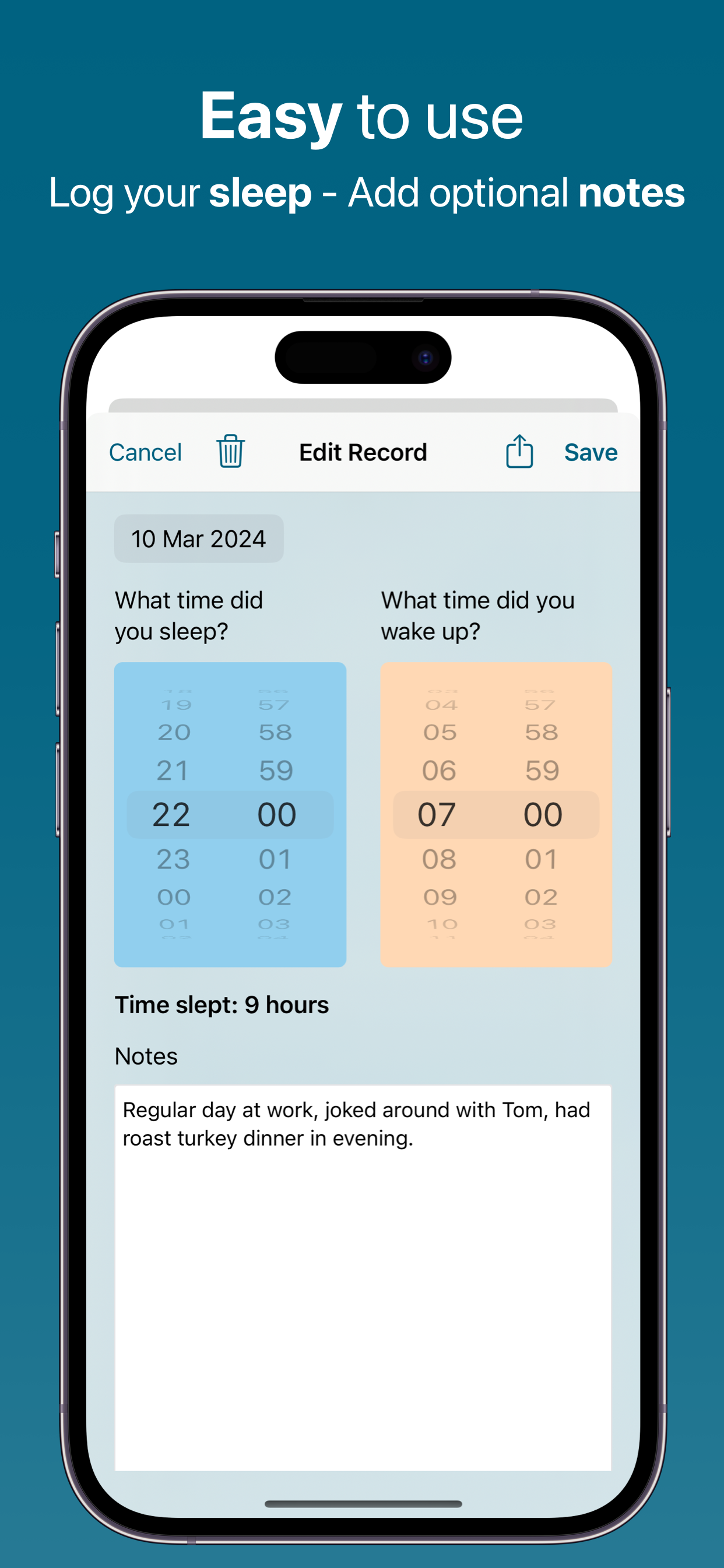
Log your sleep and wake times in seconds. No complex forms or sensors required. Just tap to record when you went to bed and when you woke up.
Automatic Duration
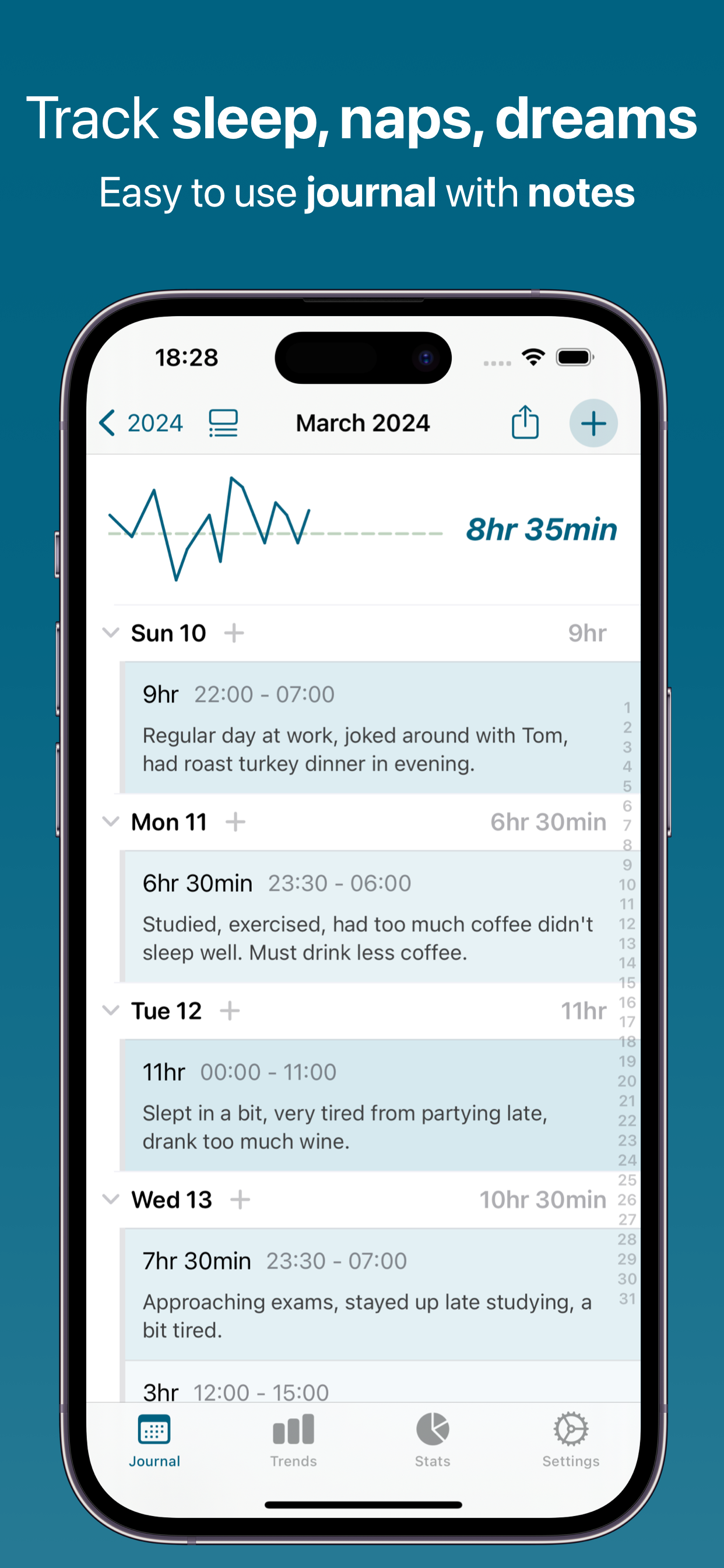
Sleep duration is calculated automatically from your sleep and wake times. See exactly how many hours you got each night at a glance.
Apple Health Integration
Import the sleep your Apple Watch or another app already recorded, and send your own entries back to Apple Health. Turn on auto-import and new nights arrive on their own.
AI Sleep Insights
Find out what shapes your nights. Trends groups the words in your notes and shows your average sleep for each one, so "coffee" nights and "walk" nights sit side by side.
Dream Analysis
Write the dream in your entry notes and ask AI what it might mean. Quick Dream Analysis is free every day; Pro Dream Analysis goes deeper, with Jungian, Freudian, neuroscience or spiritual readings and a personal symbol dictionary.
CPAP Log & Report
Note your nightly CPAP hours, AHI and any mask or leak trouble in your entries, then let the Pro CPAP Report turn them into a readable summary of adherence, AHI and mask fit. The app reads what you log, it does not connect to your machine.
Visual Sleep Charts
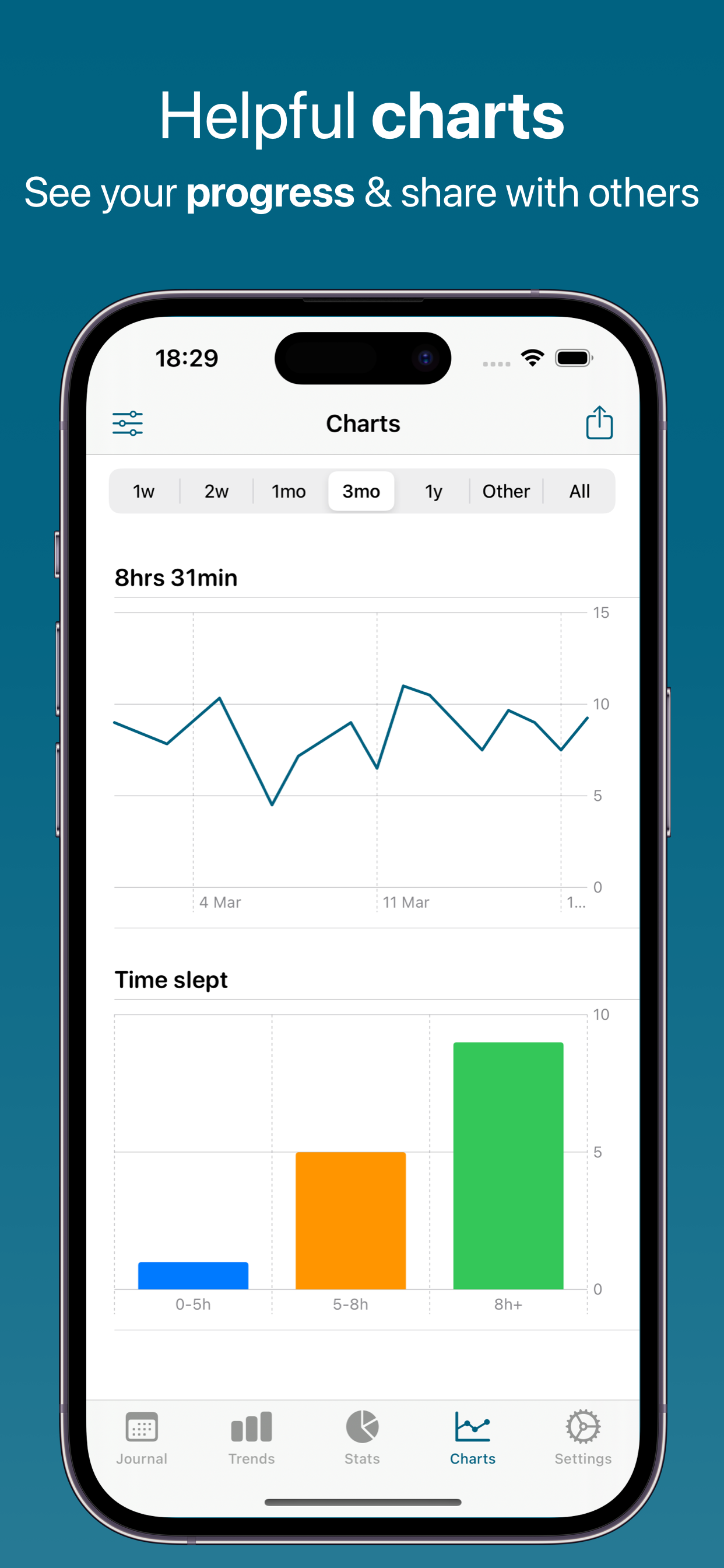
See how long you slept night after night, plus your average bedtime and average wake time, on charts you can scrub through by date.
Sleep Notes
Add notes about your day - what you ate, drank, or did before bed - and attach photos. This is the same field your dream journal lives in, and what AI reads when it looks for patterns.
Relaxation Tools
Calm Me Down for Sleep writes you a short wind-down: a breathing technique such as 4-7-8, a peaceful visualization, and a calming thought. Free every day.
Sleep Stages from Apple Health
When your Apple Watch records Core, REM and Deep sleep, Feeltracker uses those stages to work out where each night actually began and ended, and you can browse the breakdown in the app's Apple Health settings.
Your Sleep Target on the Chart
Set the hours you're aiming for and they appear as a reference line on your journal and stats charts. Easy to spot which nights you hit your goal - and which ones you didn't.
How Sleep Journal Works
A complete sleep tracking solution to help you understand and improve your rest
1. Log Sleep Times
Quick Entry: Each morning, enter when you went to bed and when you woke up. The app calculates your total sleep automatically, so you don't have to do the math - and a Siri Shortcut lets you add a sleep entry by voice.
Multiple Entries: Track naps and multiple sleep sessions per day. Perfect for shift workers, parents with interrupted sleep, or anyone with non-traditional sleep schedules.
Detailed Notes: The notes field holds the rest: the dream you just had, how rested you felt, and anything that may have shaped the night - caffeine, exercise timing, room temperature, stress, screen time, medication, or your CPAP numbers. You can attach photos too. The more you write, the more the AI has to work with.
2. Review Patterns
Calendar View: See your entire sleep history in an intuitive calendar. Each day shows its bedtime, wake time and nightly total, shaded darker the longer you slept.
Sleep Statistics: Pick any date range and see your average sleep per day, your average bedtime and your average wake time. Filter by time of day or day of the week to compare weeknights with weekends.
Visual Trends: Charts show your sleep over days, weeks, or months. See how your bedtime and wake time drift, spot irregular stretches, and track progress toward a steadier schedule.
3. Get AI Insights
Ask a Question (free): Ask in plain language - "How many hours did I average last week?" or "Which nights did I get under six hours?" - and get an answer straight from your own sleep history.
Pattern Detective (Pro): AI reads your notes alongside your sleep times and surfaces correlations you would have to hunt for by hand - whether the nights you exercised really did run longer than the ones you didn't.
Goal Assistant (Pro): Turn what you've tracked into a realistic target - a bedtime you actually keep, rather than one you keep missing.
4. Improve Your Sleep
Actionable Data: Use what you see to test a change to your routine. Try reading before bed for two weeks, then compare the nights in Trends and Stats.
Professional Reports: Export PDF, CSV, Excel, or JSON to share with a sleep specialist, your doctor, or a CPAP appointment. Exports carry your bedtimes, wake times, nightly totals and notes, so the conversation starts from real dates and numbers.
Apple Health Sync: Combine your manual logs with sleep recorded by an Apple Watch or another app. Import history into Feeltracker, or send your entries out to Apple Health for a complete picture.
Powered by Artificial Intelligence
Every user gets real AI free every day. Features marked Pro are part of the optional Pro subscription — the fullest version of each feature, on our most capable AI.
Ask a Question
Quick Q&A about your sleep data - get instant answers to your sleep questions
Chat
Have interactive conversations about your sleep health and get personalized guidance. Quick Chat is free every day; Pro Chat goes deeper on our most capable AI
Voice Summary
Listen to audio summaries of your sleep trends - perfect for on-the-go insights
Quick Dream Analysis
AI interprets your dreams with key symbols, emotional insights, and reflection questions
Calm Me Down for Sleep
Personalized relaxation techniques, breathing exercises, and peaceful visualizations to help you fall asleep
Make Me Laugh
Get personalized humor from your tracking data to brighten your day
Deep Research Pro
Comprehensive AI analysis of your sleep data with detailed insights
CPAP Report Pro
Turns the CPAP hours, AHI and mask notes you log into a report on adherence, AHI and mask fit, with action cards and follow-up questions
Pro Dream Analysis Pro
Deep psychological dream interpretation using Jungian archetypes, recurring symbols, emotional patterns, and personal symbol dictionary
Pattern Detective Pro
Find hidden correlations between your sleep quality and lifestyle factors
Goal Assistant Pro
Get personalized, data-driven sleep goals based on your patterns
Doctor Summary Pro
Generate professional sleep summaries for healthcare visits or sleep studies
Sick Note Pro
AI-generated sick notes for work or school when you need them
Generate Story Pro
Transform your sleep journey into creative, engaging narratives
Text Summary Pro
Create shareable text message summaries of your sleep trends
Personal Quiz Pro
Test your knowledge with a fun AI-generated 10-question quiz about your data
Text-to-Speech Pro
Listen to your AI insights and summaries with natural voice playback
Pro Health Report Pro
Create comprehensive, personalized sleep health documents to track your progress
Apple Intelligence (On-Device) Pro
Privacy-first option that runs AI locally on your device using Apple's Foundation Models — nothing leaves your iPhone, iPad, or Mac. Unlimited use with a paid account, on supported Apple Silicon devices (iOS 26+).
Voice Chat Pro
Hands-free, two-way spoken conversations with the AI about your data — ask questions and hear answers without touching the screen
AI Disclaimer
AI-generated insights are for general information only — not medical advice, diagnosis, or treatment. Patterns show correlations, not causation. Always consult a qualified healthcare provider for medical decisions.
Why Track Your Sleep?
Better sleep leads to better health, mood, and productivity
Manage Insomnia
Spot the habits and patterns that show up on the nights you sleep worst
More Energy
See whether you are really hitting the hours you need, night after night
Sleep Goals
Set a target and watch the reference line on your charts to build a steadier schedule
Health Insights
Bring your doctor a PDF or Excel export instead of a handwritten sleep diary
Track Improvements
See how lifestyle changes impact your sleep quality
Test Strategies
Experiment with different sleep hygiene practices and measure results
Available in 32 Languages
Sleep Journal is fully localized in: English, Spanish (Español), French (Français), French Canadian, German (Deutsch), Italian (Italiano), Dutch (Nederlands), Portuguese Brazil (Português), Portuguese Portugal, Swedish (Svenska), Norwegian (Norsk), Danish (Dansk), Finnish (Suomi), Polish (Polski), Russian (Русский), Ukrainian (Українська), Czech (Čeština), Slovak (Slovenčina), Romanian (Română), Croatian (Hrvatski), Hungarian (Magyar), Arabic (العربية), Hebrew (עברית), Simplified Chinese (简体中文), Traditional Chinese (繁體中文), Japanese (日本語), Korean (한국어), Thai (ไทย), Vietnamese (Tiếng Việt), Greek (Ελληνικά), Turkish (Türkçe), and Catalan (Català).
Frequently Asked Questions
How much sleep do I need?
Most adults need 7-9 hours of sleep a night, though individual needs vary. Sleep Journal lets you set your own target in hours, shows it as a reference line on your charts, and tracks how close each night comes - so you can find the amount that actually leaves you feeling rested.
Does this app automatically track sleep?
No - Sleep Journal is a manual sleep diary: you enter your bedtime and wake time yourself, and it calculates the duration for you. It has no sensors, does not listen while you sleep, and does not detect apnea events on its own. If a device already records your sleep, you can import those nights from Apple Health instead of typing them.
Can I log naps?
Yes - you can log as many sleep periods per day as you like in Sleep Journal, including naps and split or interrupted nights. Each entry shows its own duration, the day view adds them up, and shift workers can log an afternoon sleep exactly like a night one.
What's the difference between this and Apple Health?
Apple Health stores sleep numbers; Sleep Journal gives them a diary. You get a dream journal with photos, notes on what shaped each night, AI dream analysis, word-based trends, a sleep target line, and PDF or Excel exports for your doctor. The two work together - import from Apple Health, or send your entries back to it.
How does AI help with sleep insights?
The AI in Sleep Journal reads the notes you write alongside your sleep times and points out what the two have in common. Note "coffee at 8pm" or "ran this morning" often enough and Trends will show your average sleep for each of those words, while the AI features can put the correlation into words - free every day for questions and quick answers, and in more depth with Pro.
Can I share sleep data with my doctor?
Yes - Sleep Journal exports your sleep history as PDF, CSV, Excel or JSON, ready to email or hand over at an appointment. Exports include your bedtimes, wake times, nightly totals and notes, which is exactly what a sleep clinic or CPAP review usually asks you to bring.
Does it track sleep quality or just duration?
Sleep Journal tracks duration precisely and quality in your own words. Bedtime, wake time and total sleep are numbers it calculates; how rested you felt, how long it took to drop off and what disturbed you go in the notes, where the AI can read them. There is no automatic sleep score - the app has no sensors to compute one from.
Is there a reminder to log sleep?
Yes - Sleep Journal can send a daily reminder at a time you choose, on the days of the week you choose. Most people set it for shortly after they usually wake up, so the night is still fresh - which matters twice over if you are writing down a dream.
Do you show ads or track me?
No. Sleep Journal has no ads at all. We don't track you across other apps or websites, and we never sell your data to advertisers.
Your data syncs via iCloud - just like Apple Notes and Photos. This means we don't need to know your email address, name, or any personal information. Your sleep data is stored on your devices and in your iCloud account, and it's completely private whether you use the free version or premium.
Do I need a subscription?
No - Sleep Journal is free to download, and every user gets real AI free every day, with no ads. All sleep logging, charts, statistics, Apple Health sync and exports are free, as are Quick Dream Analysis, Quick Chat, Ask a Question, Calm Me Down for Sleep and Make Me Laugh. An optional Pro subscription unlocks the deepest AI features - Pro Dream Analysis, the CPAP Report, Deep Research, Doctor Summary, Pattern Detective, Pro Chat and more - and raises the daily limits.
Can I import sleep from my Apple Watch?
Yes - Sleep Journal imports the sleep your Apple Watch recorded through Apple Health, so you don't have to retype nights your watch already captured. Grant read access once and you can pull in your history, or turn on auto-import so new nights arrive on their own. Where your watch recorded Core, REM and Deep stages, the app uses them to work out where each night began and ended.
What does the AI dream analysis actually do?
You write the dream in your entry notes, and Sleep Journal asks AI what it might mean. Quick Dream Analysis is free every day and comes back with three to five key symbols and possible meanings, the emotional tone of the dream, and a couple of questions to reflect on - and you can ask a follow-up. Pro Dream Analysis goes further, letting you pick a Jungian, Freudian, neuroscience or spiritual lens and building a personal symbol dictionary from the dreams you record over time. It is written for self-reflection and general interest, not as psychological advice.
Does the CPAP Report connect to my CPAP machine?
No - the CPAP Report in Sleep Journal reads what you log, not your machine. There is no Bluetooth pairing and no SD card import. You note the numbers your CPAP already shows you - hours used, AHI, mask or leak trouble - in your nightly entry, answer three optional questions about mask fit, leaks and how rested you feel, and the Pro report turns all of that into a summary of adherence, AHI trend and mask fit you can read or bring to your next appointment.
Is my dream journal private?
Your dream journal stays on your devices and in your own iCloud account - Sleep Journal has no account to create, so we never see your name or email. Nothing leaves your device until you tap an AI feature, and then only what that feature needs: the entries in the range you picked, plus any profile details you have chosen to share, which you can switch off in AI settings. You can also run AI entirely on-device with Apple Intelligence on supported hardware, in which case nothing leaves your iPhone, iPad or Mac at all.
What Users Are Saying
Real reviews from the App Store
"I was so surprised that my Sleep doctor was trying to give me pieces of paper to record my sleep hours with no way to even collate them!? When I asked for an app, they suggested consensus Sleep Diary, which is useless. Luckily I found this app and I immediately asked my Sleep doctor to start recommending it. I also appreciate how responsive the developer is. Clearly this person wants to improve lives. THANK YOU!!"
"First off, please let me say, ignore the username that you see on here for me. That was an error I made early on and can't seem to change without a Mac computer, according to Apple. Now getting down to reviewing this app. This app is awesome for monitoring your sleep habits, time and being able to make notes for future reference. It's simple and easy to use. I had a suggestion, something I was hoping to have changed, and the app developer Gaurav was absolutely amazing!! I reached out to him, and he got back to me within minutes and within days he actually added my suggestion! I highly recommend using this to keep a record of your sleep patterns. And it's absolutely worth subscribing to. Gaurav Sharma, you are a rockstar!!"
"I needed something to help with sleep tracking as I was starting CPAP therapy back in November 2022. This app has been great at keeping me accountable to a schedule and looking at my progress. I can track hours slept, dreams I have had, patterns of sleep as well as other data that I want to review. Only issue is sometimes App does not open right away on my IPAD and have to force close it and then re-open it. Update - have used app 400 nights now and it shows me progress I've made in my CPAP therapy and a lot of useful insights!"
"That's all it took to make the difference between 2 and 5 stars for me. However, if this changes, then so will this review :) thank you for this amazing app."
"i try to log 0 hrs of sleep and it won't save my tracking. Also the questions don't allow for tracking 0 sleep, with questions like 'how long did it take to fall asleep' and no option to say you haven't slept. Edit: Yes I see how to log it correctly now, thank you for responding"
"This sleep journal is perfect for what I needed. It's well designed and easy to use. Thank you so much developers for making it free"
"Simple to use."
"I've been using this app for a few weeks because I sleep very irregular hours and found it hard to keep track of my sleep time. Sleep Journal was just what I needed. At one point I found a bug in how multiple entries per day were being totaled. I reported it to the developer who not only replied quickly to me and kept me aware of his progress but also had the big fixed in just a few days. Thanks Gaurav!"
"Simple and effective!"
"This is the most convenient way to keep a consistent record of your sleep schedule and identify habits that can be affecting your sleep. You really don't need any other app"
Sleep Guides
Plain-English guides to sleeping better — how much you need, what happens across a night, and what actually helps.
How Much Sleep Do You Need?
Recommended hours by age, and the signs you are running short.
Sleep Cycles and Stages Explained
What each stage does, and how a night is really structured.
Sleep Calculator: When to Go to Bed
Bedtimes worked backwards from the time you need to wake.
How to Fall Asleep Faster
Techniques that hold up, and the 20-minute rule.
Sleep Hygiene: Habits That Work
The full checklist, and which items actually matter most.
Insomnia: Causes and What Helps
Acute versus chronic, and why CBT-I comes before sleeping pills.
Sleep Apnea Signs and Symptoms
Night-time and daytime signs, and when to ask for a sleep study.
CPAP Therapy: Adjusting and Tracking
Fixes for the first difficult weeks, and why usage tracking matters.
How to Get More Deep Sleep
What slow-wave sleep does, and what genuinely increases it.
Sleep Diary Template
What to record each morning, and how clinicians use it.
Does the Apple Watch Track Sleep?
What it measures, what it estimates, and what it cannot see.
Sleep Tracking Apps: How to Read the Numbers
What each kind of tracker can sense, and what the readout means.
Explore our other apps

Start Improving Your Sleep Tonight
Better rest is just a few taps away