
Mood Journal
Rate how you feel in seconds, add a note about what happened, and let AI help you read the pattern back. See what lifts you, what wears you down, and how your mood moves across weeks and months.

Free app with optional premium features
iPhone, iPad & Mac • iOS 16.0+

See Mood Journal in Action
Simple Tools for Mental Wellness
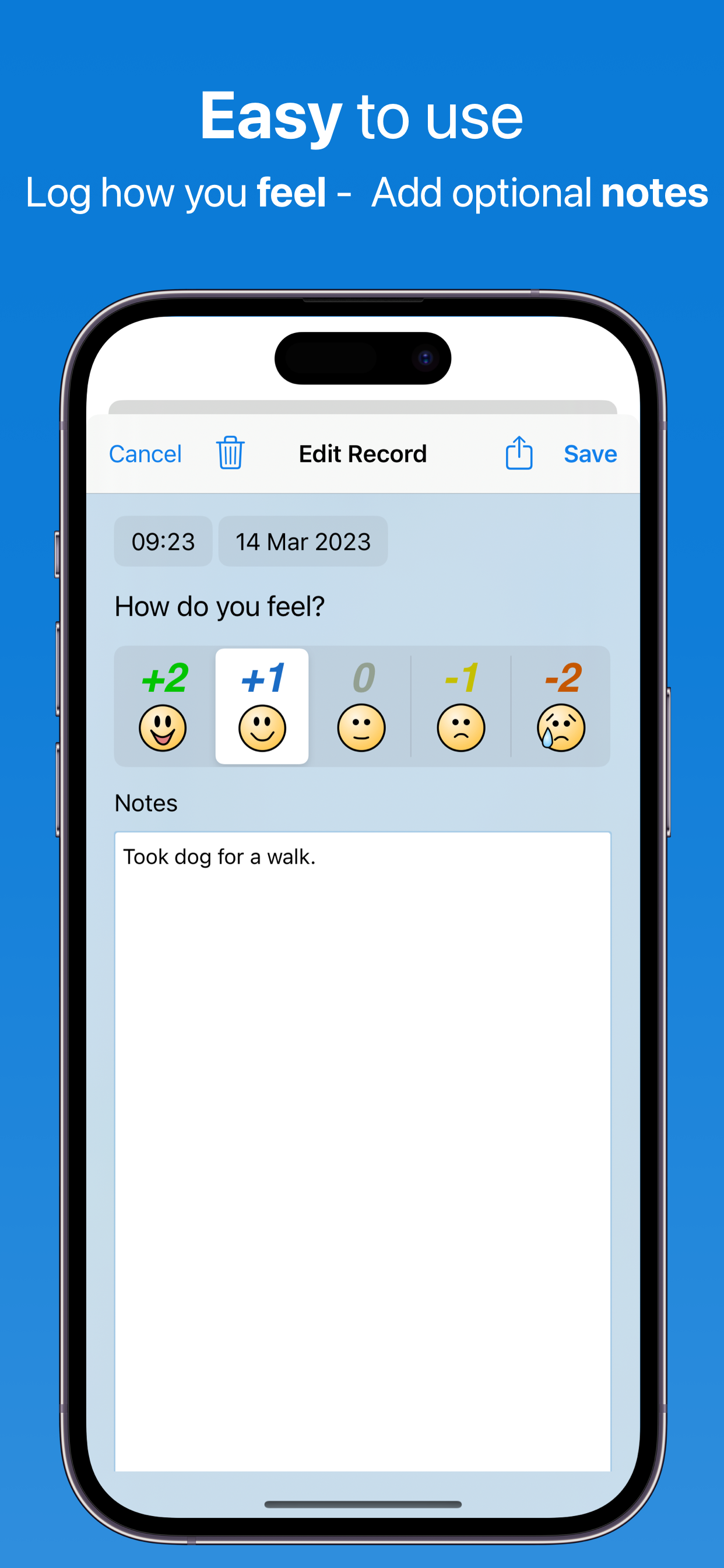
Simple 5-Point Scale
Rate your mood from very sad to very happy in seconds. No complex questionnaires - just quick, honest check-ins throughout your day.
AI Face Scanning
Take a selfie and AI reads the expression to suggest a rating on the 5-point scale. It's a starting point for the days when picking a number feels like work — you confirm it or change it before saving. Free for everyone.
iOS 18+ State of Mind
Two-way Apple Health sync on iOS 18 and later. Moods you log here are written to State of Mind, and State of Mind entries you logged elsewhere are read back in — so one mood history covers everything.
AI Trigger Detection
AI reads the notes you've written and surfaces the people, places, activities and situations that show up alongside your best and worst days. A Quick Trigger Check is free every day; the deeper Pro Trigger Identifier comes with Pro.
Visual Mood Charts
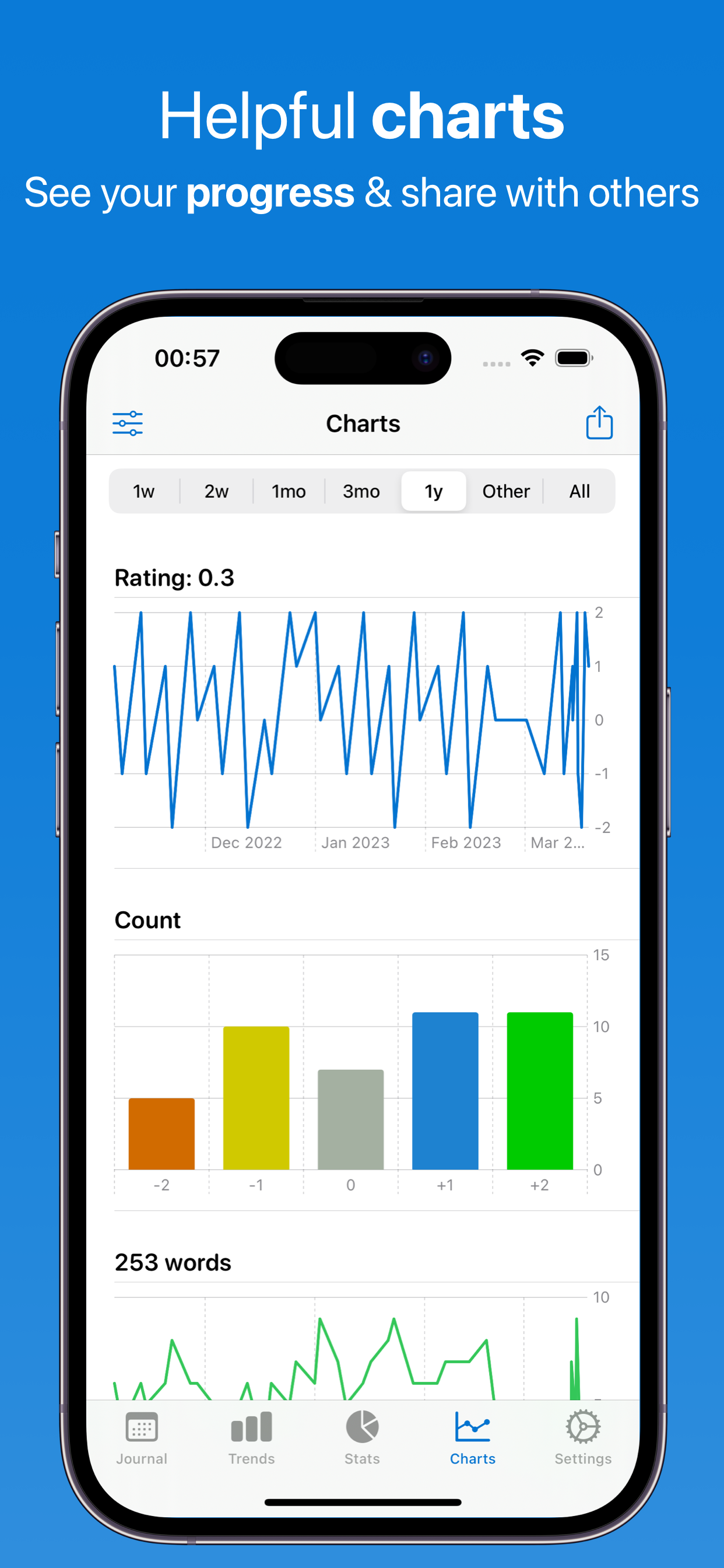
Line and bar charts over any date range, plus averages, highs and lows and how your entries spread across the scale. A year view heatmap shows every day you logged at once.
Two AI Cameras for Mood
Capture how you look with the front camera or what's around you with the back. AI suggests a mood rating and adds context to your entry — a richer log without typing more.
Sound, Color, and Touch
Each rating has its own color, gentle sound, and haptic — small sensory cues that make every check-in feel natural rather than clinical.
Private Notes
Write as much or as little as you want about what happened, and a sentiment gauge reads the tone back to you as you type. With AI switched off it runs entirely on your device.
Completely Private
No advertisements. No IDFA tracking. Your mood data is encrypted and stored only on your devices and iCloud. We don't track you across apps or websites, and we never sell your data to advertisers.
How Mood Journal Works
Four steps, and the first one takes about five seconds a day
1. Log Your Mood
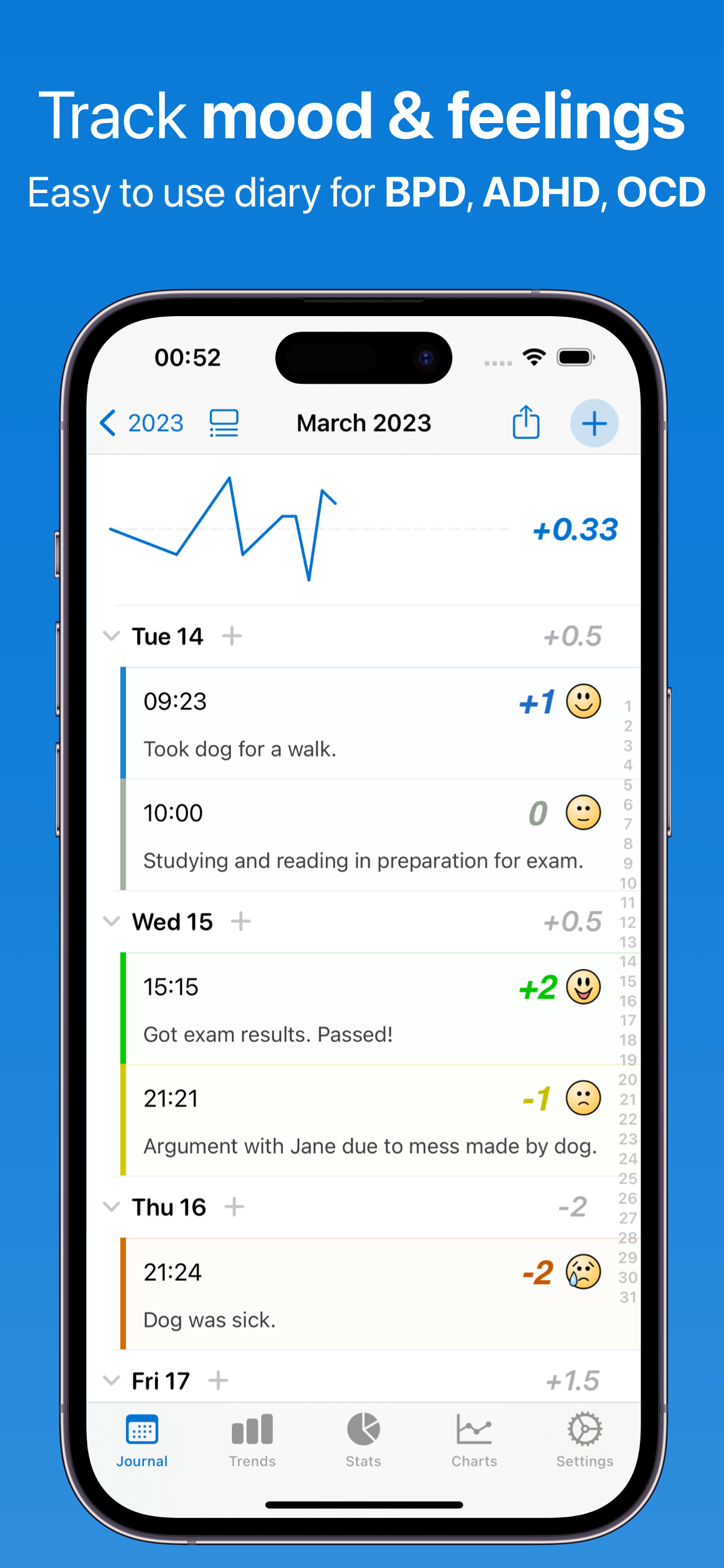
Simple Rating Scale: Tap one of five faces to rate how you're feeling. Each one has its own color, sound and haptic, so a check-in takes about five seconds and doesn't feel like filling in a form. Log as often as you like — every entry is timestamped, and most days aren't one single mood.
AI Face Scanning: On the days when picking a number feels like work, take a selfie and let AI suggest a rating from your expression. It's a prompt, not a verdict — you confirm or change it before saving. A Scene Scanner can read your surroundings instead. Both are free.
Detailed Context: Add notes about what's happening — who you were with, what you did, how you slept, anything that stood out. A sentiment gauge reads the tone of what you wrote as you type. The notes are also what the AI trigger features work from, so a line or two beats nothing at all.
Photos & Weather: Attach photos to any entry, and turn on the daily weather so each day in your journal shows the conditions next to your entries. You can choose to include that weather when an AI feature analyzes your data — useful if the grey days seem to land differently.
2. See Patterns
Journal Views: Browse your mood history by year, month or day. The year view is an activity heatmap, the month view a color-coded calendar, and the day view lists every entry you made — so good weeks, rough patches and gaps are all obvious at a glance.
Stats: For any date range you pick, see your average, highest and lowest mood, how many entries you made, and how those entries spread across the five points of the scale.
Trend Charts: Line and bar charts plot your mood over days, weeks, months or a full year, with interactive points you can tap. Seeing it drawn out is what makes a slow drift, a seasonal dip or a steady climb visible in the first place.
3. Discover Triggers
AI Pattern Recognition: AI reads your ratings and notes together and reports back what tends to occur alongside what — for example, that your higher-rated days often mention exercise, or that ratings dip in the days after you write about sleeping badly. These are correlations in your own data, not causes.
Trigger Identification: See which people, places, activities and situations keep turning up on your best and worst days. A Quick Trigger Check is free every day; the Pro Trigger Identifier looks across a longer range in more depth.
Conversational Insights: Ask in plain language — "What comes up most on my good days?" or "Show me my lowest days this month" — and get an answer drawn from your own entries. Ask a Question and Quick Chat are free every day.
4. Share with Care Team
Reports You Can Hand Over: Export your history as PDF, CSV, Excel or JSON. A PDF export can include your mood chart, the summary stats for the range, and the notes you wrote — a compact record to bring to an appointment instead of trying to recall six weeks from memory.
Apple Health Integration: On iOS 18 and later your moods sync both ways with Apple Health State of Mind, so they sit alongside the rest of your health record and travel with it.
Useful Alongside Therapy: Plenty of people here are tracking mood while doing DBT or CBT work, or while starting or changing a medication, and bring the charts to their sessions. Feeltracker is a tracking and journaling tool that helps you notice and describe what happened — it doesn't deliver therapy, and it isn't a substitute for care from a qualified professional.
Powered by Artificial Intelligence
Every user gets real AI free every day. Features marked Pro are part of the optional Pro subscription — the fullest version of each feature, on our most capable AI.
Ask a Question
Ask a one-off question about your own entries and get a straight answer back — free every day
Chat
Have interactive conversations about your emotional wellbeing and get personalized guidance. Quick Chat is free every day; Pro Chat goes deeper on our most capable AI
Voice Summary
Listen to audio summaries of your mood trends - perfect for on-the-go insights
AI Face Scanning
Scan your facial expression to get mood suggestions based on AI analysis of your emotional cues
Make Me Laugh
Get personalized humor from your tracking data to brighten your day
Calm Me Down
A guided breathing and grounding exercise for when you want to slow down for a minute — free every day
Deep Research Pro
Comprehensive AI analysis of your mood data with detailed insights
Pattern Detective Pro
Find hidden correlations between your mood and lifestyle factors
Goal Assistant Pro
Get personalized, data-driven mental wellness goals based on your patterns
Doctor Summary Pro
Generate professional mental health summaries to share with therapists
Sick Note Pro
AI-generated sick notes for work or school when you need them
Generate Story Pro
Transform your mood journey into creative, engaging narratives
Text Summary Pro
Create shareable text message summaries of your mood trends
Personal Quiz Pro
Test your knowledge with a fun AI-generated 10-question quiz about your data
Text-to-Speech Pro
Listen to your AI insights and summaries with natural voice playback
Pro Health Report Pro
Create comprehensive, personalized mental health documents to track your progress
Trigger Identifier Pro
Discover what activities, people, and situations affect your mood the most
Cognitive Reframing Pro
Get fresh perspectives on negative thoughts using CBT-inspired AI techniques
Sentiment Timeline Pro
Visualize your emotional journey over time with AI-analyzed sentiment tracking
Apple Intelligence (On-Device) Pro
Privacy-first option that runs AI locally on your device using Apple's Foundation Models — nothing leaves your iPhone, iPad, or Mac. Unlimited use with a paid account, on supported Apple Silicon devices (iOS 26+).
Voice Chat Pro
Hands-free, two-way spoken conversations with the AI about your data — ask questions and hear answers without touching the screen
AI Disclaimer
AI-generated insights are for general information only — not medical advice, diagnosis, or treatment. Patterns show correlations, not causation. Always consult a qualified healthcare provider for medical decisions.
Why Track Your Mood?
A few seconds a day adds up to something you can actually look back on
Spot Your Patterns
See the rhythms you can't hold in your head — which days of the week run low, how long a rough patch usually lasts
Keep a Record of Changes
Note the day something changed — a new routine, a dose, a job — and see what your mood did in the weeks either side
Notice Drifts Sooner
A chart makes a slow slide obvious weeks before memory does, so you can act on it early
See How Far You've Come
Compare this month with six months ago instead of guessing — bad weeks feel less total when you can see the whole line
Come to Appointments Prepared
Bring a chart and your own notes instead of trying to reconstruct six weeks from memory in the first five minutes
Know Yourself Better
Naming a feeling and writing down what surrounded it is the whole habit — the insights come from doing it regularly
Available in 32 Languages
Mood Journal is fully localized in: English, Spanish (Español), French (Français), French Canadian, German (Deutsch), Italian (Italiano), Dutch (Nederlands), Portuguese Brazil (Português), Portuguese Portugal, Swedish (Svenska), Norwegian (Norsk), Danish (Dansk), Finnish (Suomi), Polish (Polski), Russian (Русский), Ukrainian (Українська), Czech (Čeština), Slovak (Slovenčina), Romanian (Română), Croatian (Hrvatski), Hungarian (Magyar), Arabic (العربية), Hebrew (עברית), Simplified Chinese (简体中文), Traditional Chinese (繁體中文), Japanese (日本語), Korean (한국어), Thai (ไทย), Vietnamese (Tiếng Việt), Greek (Ελληνικά), Turkish (Türkçe), and Catalan (Català).
Frequently Asked Questions
How often should I track my mood?
Once or twice a day is enough to build a useful picture in Mood Journal, and consistency matters far more than frequency. A morning and an evening check-in catches the fact that most days aren't one single mood. Log extra entries whenever something notable happens — there's no limit, and each one is timestamped. You can set up to four daily reminders, each with its own time and days of the week, to help the habit stick.
What is Apple Health State of Mind?
State of Mind is Apple's own mood logging feature in the Health app, introduced in iOS 18, and Mood Journal syncs with it in both directions. Every mood you rate here can be written to Apple Health as a State of Mind entry, and moods you logged elsewhere — on your Apple Watch, or in Apple's Health app itself — can be imported back in, with duplicates filtered out automatically. You control both directions with separate switches in Settings, and either can be left off. This requires iOS 18 or later.
Can this app replace therapy?
No — Mood Journal is a tracking and journaling tool, not a treatment, and it is not a medical device. It can help you notice and describe what's been happening, which is genuinely useful to bring into therapy, but it does not diagnose anything and its AI insights show correlations in your own data, not causes. If you're struggling, please talk to a licensed therapist, counselor, doctor, or psychiatrist. If you're in crisis, contact your local emergency services or a crisis line right away.
How does AI trigger detection work?
Mood Journal's Trigger Identifier reads the notes attached to your mood entries and reports which recurring words, people and activities show up on your higher- and lower-rated days. For example, if "coffee with Sarah" appears several times and those days are consistently rated higher, it surfaces that as a positive influence. It only works as well as the notes you write, and what it finds are correlations in your own data, not proof of cause. A free Quick Trigger Check is included for everyone every day; the deeper Pro Trigger Identifier is part of the optional Pro subscription. Analysis runs on privacy-respecting cloud AI, or fully on-device with the Apple Intelligence option (Pro, on supported devices running iOS 26 or later).
Is my mood data private?
Yes — your mood entries live on your own device and in your own private iCloud account, and Feeltracker has no server that stores them. We never sell your data, never use it for advertising, and there are no ads or third-party tracking in the app. The one exception is worth stating plainly: when you use an AI feature, the entries needed for that request are sent to our AI provider to generate the response, and they are never used to train models or sold on. If you'd rather nothing left the device at all, you can switch AI off entirely, or use the on-device Apple Intelligence mode. The full detail is in our privacy policy.
Can I export my mood history?
Yes — Mood Journal exports your full mood history as PDF, CSV, Excel or JSON, for any date range you choose, and it's free. The PDF is the one to hand to another person: it can include your mood chart, the summary statistics for that range, and the notes you wrote. CSV, Excel and JSON are the ones to keep, since they open anywhere and mean your history is never locked inside this app. Trends has its own export as Excel, PDF, HTML or plain text.
Does it work offline?
Yes — all of Mood Journal's tracking works offline. Rating your mood, writing notes, attaching photos, browsing your journal, viewing charts and stats, and exporting all work with no connection at all. Entries sync to iCloud automatically once you're back online. The only parts that need internet are the cloud AI features and the camera scanners; the on-device Apple Intelligence mode (Pro) runs its AI without a connection too.
Can I track mood for specific conditions?
Mood Journal is a general mood tracker rather than a condition-specific tool, and people use it alongside all sorts of things — depression, anxiety, bipolar disorder, BPD, PTSD, ADHD, seasonal patterns, or no diagnosis at all. What it gives you is the same in every case: a timestamped rating, your own notes, and charts over time. It has no clinical questionnaires, no symptom scoring and no diagnosis of any kind, so treat what you see as a record to discuss with your healthcare provider, not as an assessment.
Do you show ads or track me?
No. We've completely removed all advertisements from the app. We don't track you across other apps or websites, and we never sell your data to advertisers.
Your data syncs via iCloud - just like Apple Notes and Photos. This means we don't need to know your email address, name, or any personal information. Your mental health data is stored on your devices and in your iCloud account, and it's completely private whether you use the free version or premium.
Do I need a subscription?
No subscription is required. The app is free to download, all tracking, charts, Apple Health sync, and exports are free, and every user gets real AI features free every day — with no ads, ever. An optional Pro subscription unlocks the most in-depth AI features (Deep Research, Trigger Identifier, Cognitive Reframing, Doctor Summary, Pro Chat, and more), runs them on our most capable AI, and raises the generous daily limits.
Can I share my mood tracking with my therapist or doctor?
Yes — exporting a PDF is the usual way people bring Mood Journal into an appointment. Pick a date range, and the PDF can include your mood chart, the summary statistics for that period, and the notes you wrote, ready to email or print. Pro adds a Doctor Summary that turns the same period into a written narrative you can read over before you go. Nothing is shared automatically and there is no clinician portal — an export only ever leaves your device when you send it yourself.
Does Mood Journal work on iPad and Mac?
Yes — one free download covers iPhone, iPad and Mac, and your history syncs between them through your own iCloud account. It needs iOS 16 or later. Rate a mood on your phone during the day and the entry is there when you sit down to review the month on a bigger screen. There's also a home-screen widget showing your entry count and averages with a + button for adding an entry in one tap.
How accurate is the AI face scanner?
The Face Scanner reads the expression in a selfie and suggests a rating on the 5-point scale — treat it as a starting point you confirm or override, never as a verdict on how you feel. An expression is not the same thing as an emotion, and it can easily read a tired face as a low mood. It's genuinely useful on days when picking a number feels like work, and it's free for everyone, with a daily cap to prevent abuse. There's also a Scene Scanner that looks at your surroundings instead, for context rather than a rating.
What happens to my notes when I use an AI feature?
The entries relevant to that request are sent to our AI provider to generate a response, and nothing else. They are never used to train models, never used for advertising, and never sold. Our relay passes requests through without storing their content, though the provider retains responses for a limited period under their own terms. Feeltracker never links any of it to your name or email, because the app never asks for either. If you'd rather keep everything on the device, Pro's Apple Intelligence mode runs the text features on-device on supported hardware, and AI can be switched off entirely in Settings — the note sentiment gauge then runs locally too. See the privacy policy for the full picture.
What Users Are Saying
Real reviews from the App Store
"I just got diagnosed with adhd about a month ago. And I had to wait for 3 weeks to get meds for it. During that time I found this app, and it's been pretty amazing to see the erraticness of my un medicated brain compared to my medicated brain. My medicated brain is much more level in the graph. Plus I like that I can jot down what's on my mind really fast."
"As someone with bipolar disorder I needed to record my moods and emotions but I couldn't find an app that didn't want an expensive subscription. I'm very thankful for this app, full functionality without a subscription and a subscription option if you want one."
"i like how i dont need to pay for everything, on my other mood apps i have to pay to see what triggers me i like when it tells you what words affect you the most. it has a passcode or a lock on it if you only want yourself reading what u type. it really helped me correct myself. i've been doing this almost everyday and i see the charts and i can see when and where i improve or downgrade. i really enjoy this app and i like the sound effects it makes when your clicking your moods."
"I have one question before I start..how do you get down there to type? Okay so I just started like one minute ago and I'm already happy! Oh btw(by the way) I love the noises they make me laugh! This app tells you, 'how are you feeling today' something like that with the emojis You should totally get this app!!! Whoever made this must have worked really hard, so byeeee!!! From, Lila To, The person who made this!"
"Only used it a couple days, but I love that I can enter multiple notes per day with auto time stamp (that I can edit if I want). The 5 smiley face ratings are just right to cover ups and downs throughout the day. Hope the app gets enough users to keep the developers going!"
"I'm enjoying this app as a place to jot down thoughts and feelings during the day. The little mood face makes me think about what I might want to consider in order to enjoy my life more. I've tried a few of these apps and I'm liking this one best."
"I love using this like a journal to keep track of what's going on in my life. It's helpful to look at the graphs and trends to see where patterns are as well as what stands out. Works great!"
"Not paid. Just another with depression. I love this app. Can see patterns or remember a week that I wouldn't. The graph is something you can't get with paper journal. Love ing this app."
"Harlemhoney"
"Easy to use, how you feel should be incorporated into the Health App"
Mood Tracking Guides
Understanding what you feel and what moves it — practical guides to tracking mood, spotting patterns, and getting through hard days.
How to Track Your Mood
What to log and when, and why consistency beats detail.
Reading Your Mood Chart
Baseline, range and cycles — how to read a chart without over-reading it.
Mood Swings: Causes and Patterns
What commonly drives them, and when a pattern is worth raising.
The Emotion Wheel
From core feelings to precise words, and why naming helps.
Mood Journal Prompts
Prompts for daily check-ins, hard days, good days and patterns.
DBT Skills: A Plain-English Guide
The four modules explained, with a real skill from each.
BPD and Mood Tracking
The nine criteria in human language, and why tracking helps.
Tracking Anxiety
Physical and cognitive signs, and how a record finds triggers.
Grounding Techniques
Techniques that work in the moment, grouped by intensity.
Seasonal Mood Changes
Why a full year of data is what reveals a seasonal pattern.
Explore our other apps




Start Understanding Your Emotions
Free to download, and a check-in takes about five seconds