Blood Pressure Journal
The smartest way to track and understand your blood pressure. Scan readings with Camera Scan AI, sync with Apple Health, and get AI-powered insights into your cardiovascular health.

Free app with optional premium features
iPhone, iPad & Mac • iOS 16.0+

See Blood Pressure Journal in Action
Powerful Features for Blood Pressure Management
Camera Scan AI
Simply point your camera at your blood pressure monitor's screen and let the app automatically read and record your systolic, diastolic, and pulse values. No manual typing needed.
Comprehensive Tracking
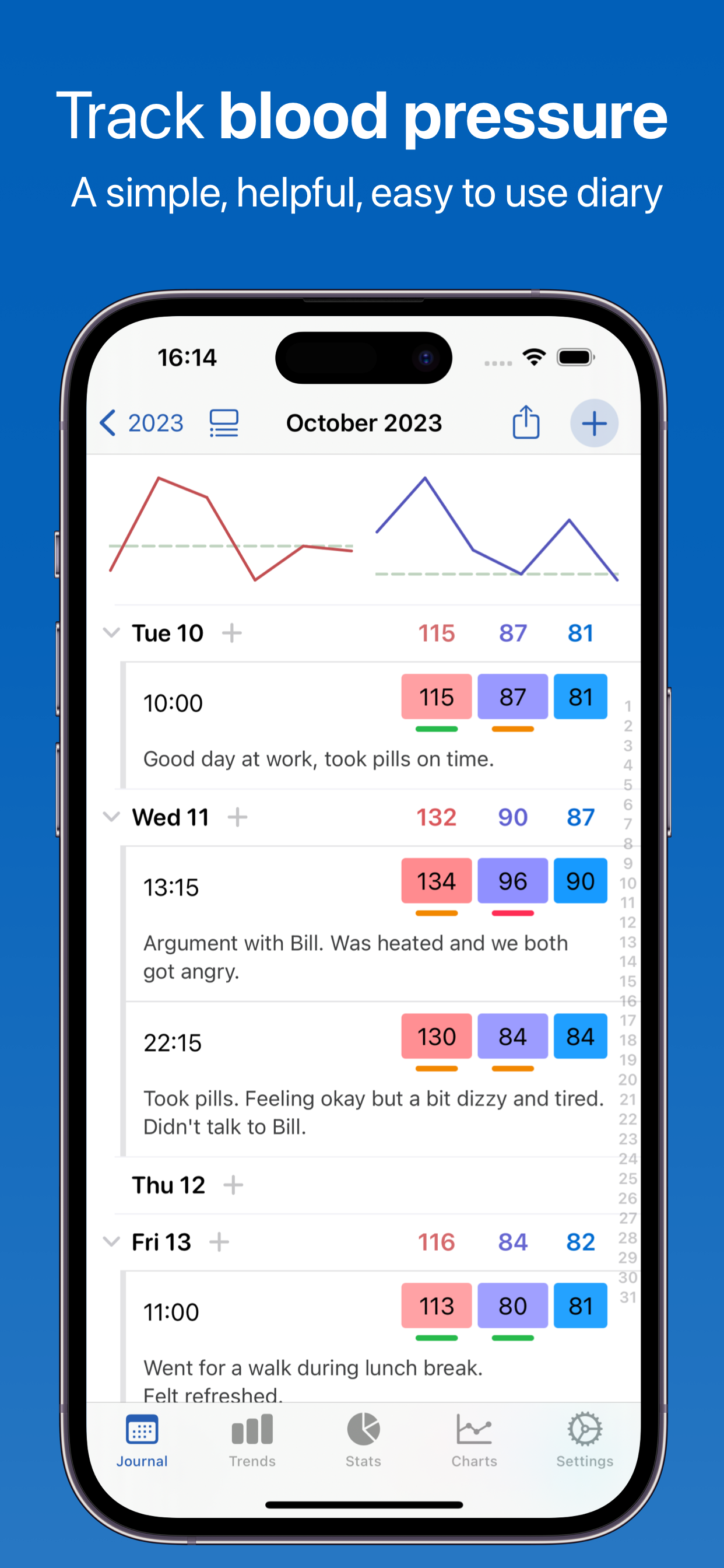
Monitor systolic and diastolic blood pressure, heart rate/pulse, and Mean Arterial Pressure (MAP). Track multiple readings per day to capture variations throughout your day.
Apple Health Integration
Seamlessly sync with Apple Health. Import your historical blood pressure data and automatically save new readings to HealthKit for comprehensive health tracking.
AI-Powered Insights
Discover what affects your blood pressure with intelligent pattern detection. Get personalized insights about triggers, lifestyle factors, and trends over time.
Doctor-Ready Reports
Export your blood pressure history as PDF, CSV, Excel, or JSON reports. Share comprehensive data with your healthcare provider in a format they can easily review.
Visual Charts & Trends
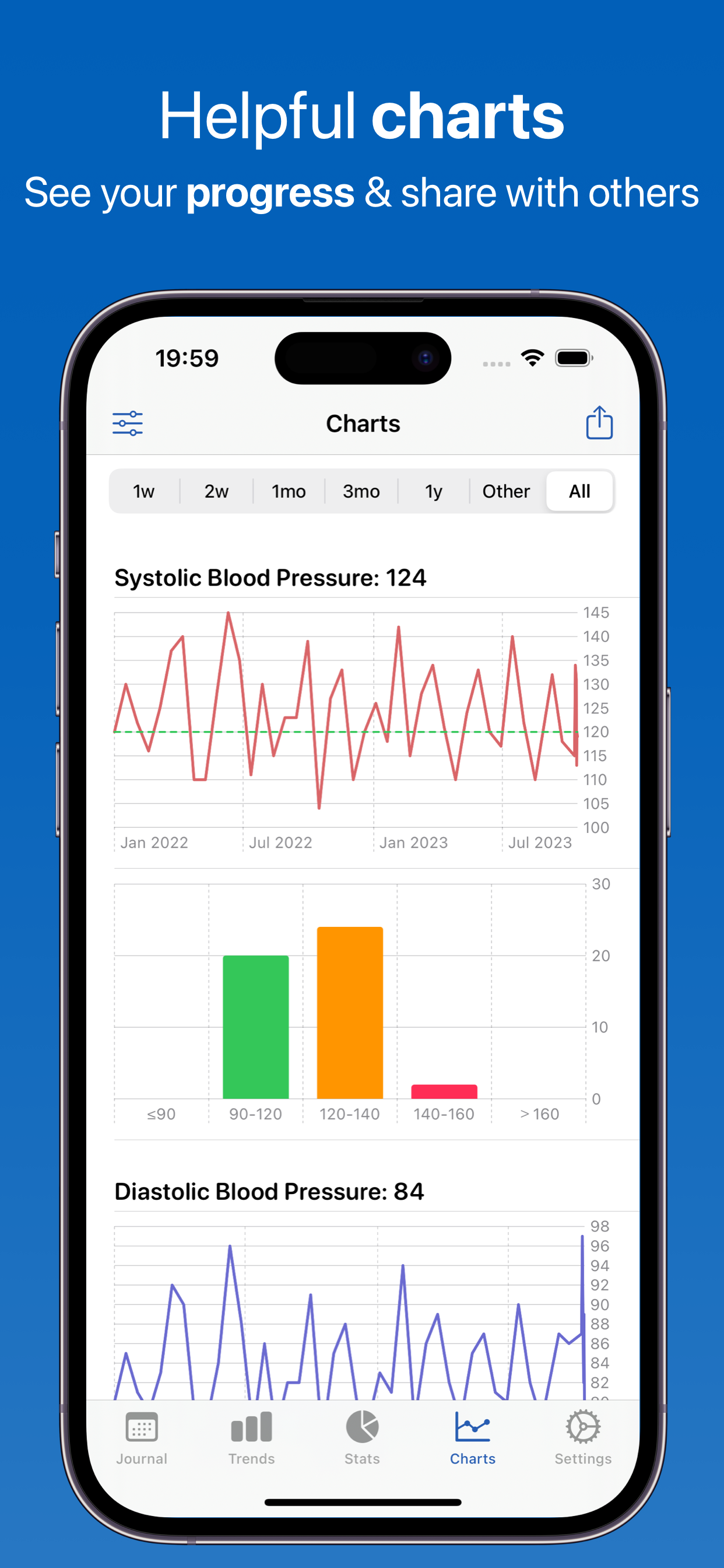
See your blood pressure trends at a glance with beautiful charts. Identify patterns by day, week, month, or custom date ranges.
MAP Report for Your Doctor
A free PDF report that breaks down your Mean Arterial Pressure across morning, evening, and full-day windows for any month, quarter, year, or custom range. Built to make clinical conversations easier. Pro adds an AI-written Pro MAP Report on top.
Your Ranges, Your Way
Set your own target systolic, diastolic, and pulse values — they appear as reference lines on your charts — and adjust the range thresholds (Low, Normal, Elevated, High, Very High) to match the guidance your doctor has given you. Charts and reports color every reading by your own ranges.
Your History, Safely Kept
Readings sync across your iPhone, iPad, and Mac through your own private iCloud account, and the app writes automatic weekly backups you can restore from at any time. Moving from a spreadsheet? Import your history from an Excel file using the built-in template.
How Blood Pressure Works
A comprehensive system designed for effective blood pressure management
1. Record Your Reading
Camera Scan AI: Simply point your camera at your blood pressure monitor's display and let AI automatically extract systolic, diastolic, and pulse values. No typing needed - the app reads the numbers directly from OMRON, Microlife, Beurer, and most digital monitors.
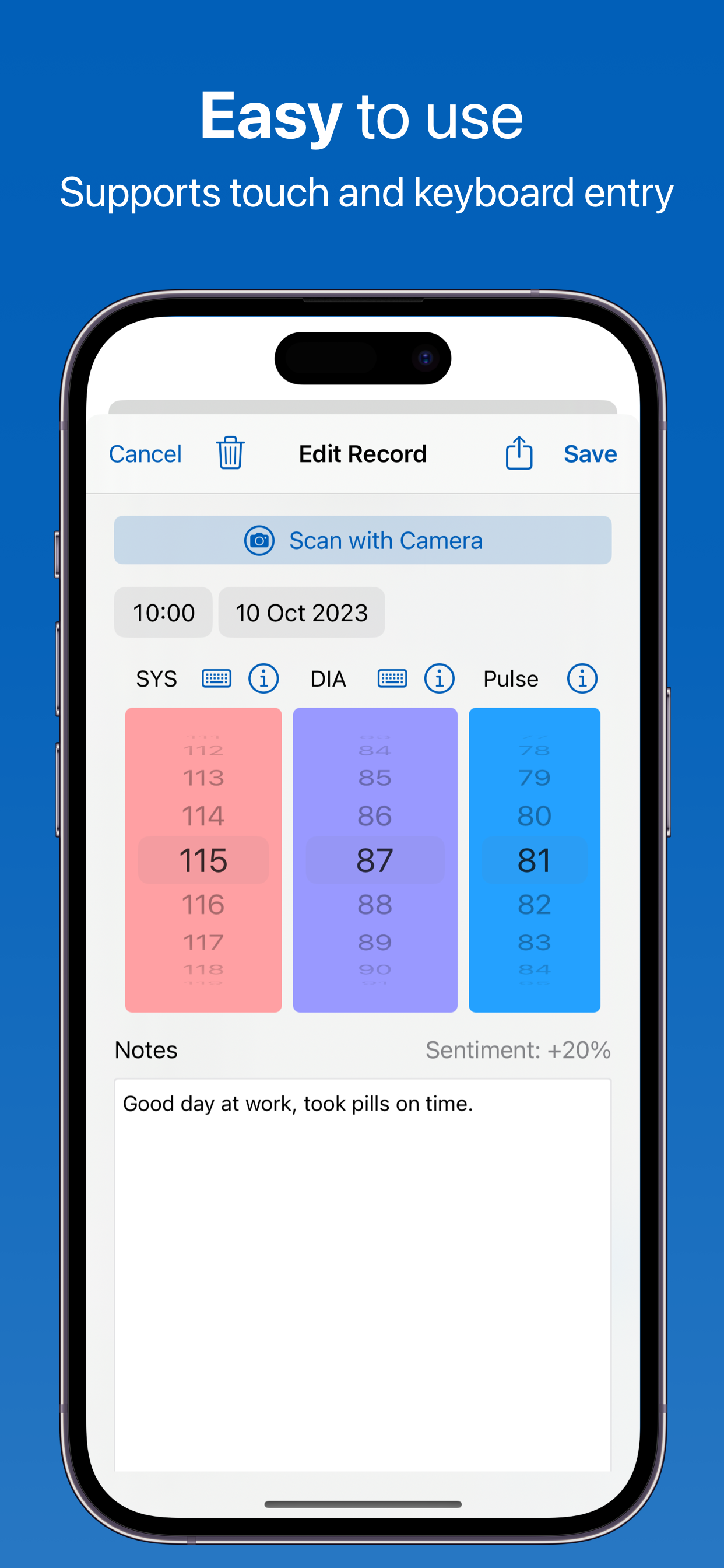
Manual Entry: Prefer to type? Enter values manually with a streamlined interface. Takes just seconds to log a reading.
Rich Context: Add detailed notes about what you were doing - meals eaten, medications taken, exercise, stress levels, sleep quality, or any factors that might affect your blood pressure. You can attach up to 8 photos to a reading, and find any entry again later straight from iOS Spotlight search.
2. Track Patterns
Calendar View: See all your readings in an intuitive calendar layout. Each day shows your measurements with color-coded indicators for low, normal, elevated, high, or very high readings - based on widely used guidelines, or on the ranges you set yourself.
Automatic Statistics: Get instant averages over any date range, your lowest and highest readings, and a breakdown of how many readings fell into each range - no math required.
Visual Charts: Separate systolic, diastolic, MAP, and pulse charts show your trends over days, weeks, months, or any custom date range, each with your target value drawn as a reference line.
3. Get AI Insights
Pattern Detection: AI analyzes your readings and notes to identify correlations. Discover what activities, foods, or situations consistently raise or lower your blood pressure.
Personalized Recommendations: Get specific insights based on your data. The AI might notice patterns like "Your BP tends to be higher on days when you mention 'stressed at work'" or "Readings are lower on days with morning exercise."
Chat with Your Data: Ask questions in natural language like "What was my average BP in the evenings last month?" or "Show me readings after I took my medication." The AI understands context and gives you instant answers.
Free every day: Ask a Question, Quick Chat, Voice Summary, and a Quick Health Report are included for everyone, with a generous daily allowance. The deepest reports - Deep Research, Pattern Detective, Doctor Summary, the Pro MAP Report - come with the optional Pro subscription.
4. Share with Your Doctor
Professional Reports: Export comprehensive PDF, CSV, Excel, or JSON reports formatted for medical review. Reports include summary statistics, trend charts, and all your notes - everything your doctor needs in one document.
Apple Health Integration: Automatically sync all readings to Apple Health. Import historical data from other apps or devices. Your blood pressure data stays connected with your complete health picture.
Cloud Backup: All data is automatically backed up to your private iCloud account. Switch devices seamlessly - your entire blood pressure history moves with you, encrypted and secure.
Powered by Artificial Intelligence
Every user gets real AI free every day. Features marked Pro are part of the optional Pro subscription — the fullest version of each feature, on our most capable AI.
Ask a Question
Quick Q&A about your blood pressure data - get instant answers to your health questions
Chat
Have interactive conversations about your cardiovascular health and get personalized guidance. Quick Chat is free every day; Pro Chat goes deeper on our most capable AI
Voice Summary
Listen to audio summaries of your blood pressure trends - perfect for on-the-go insights
Make Me Laugh
Get personalized humor from your tracking data to brighten your day
Calm Me Down
AI-guided breathing and relaxation exercises to help you unwind after a stressful day
Camera Scan AI
Scan readings straight from your monitor's screen - works with OMRON, Microlife, Beurer and most digital displays. Free for everyone, with a generous daily allowance
Deep Research Pro
Comprehensive AI analysis of your blood pressure data with detailed insights
Pattern Detective Pro
Find hidden correlations between your BP readings and lifestyle factors
Goal Assistant Pro
Get personalized, data-driven blood pressure goals based on your patterns
Doctor Summary Pro
Generate professional medical summaries to share at healthcare visits
Sick Note Pro
AI-generated sick notes for work or school when you need them
Generate Story Pro
Transform your health data into creative, engaging narratives
Text Summary Pro
Create shareable text message summaries of your blood pressure trends
Personal Quiz Pro
Test your knowledge with a fun AI-generated 10-question quiz about your data
Text-to-Speech Pro
Listen to your AI insights and summaries with natural voice playback
Pro Health Report Pro
Create comprehensive, personalized health documents to track your progress. A free Quick Health Report is included for everyone
Apple Intelligence (On-Device) Pro
Privacy-first option that runs AI locally on your device using Apple's Foundation Models — nothing leaves your iPhone, iPad, or Mac. Unlimited use with a paid account, on supported Apple Silicon devices (iOS 26+).
Voice Chat Pro
Hands-free, two-way spoken conversations with the AI about your data — ask questions and hear answers without touching the screen
Pro MAP Report Pro
An AI-written report on your Mean Arterial Pressure: morning versus evening patterns, day-to-day variability, and how your readings sit against the MAP bands you set — including an optional LVAD focus. Built to hand to a care team
AI Disclaimer
AI-generated insights are for general information only — not medical advice, diagnosis, or treatment. Patterns show correlations, not causation. Always consult a qualified healthcare provider for medical decisions.
Why Track Your Blood Pressure?
Regular monitoring helps you and your healthcare provider make better decisions
Manage Hypertension
Build a day-by-day record of your readings so you and your doctor can see how your numbers are actually behaving between appointments
Medication Effectiveness
Note the medications you take in each entry and watch how your readings respond over time
Lifestyle Impact
Understand how diet, exercise, stress, and sleep affect your blood pressure
White Coat Syndrome
Provide your doctor with home readings to get a more accurate picture of your health
Early Detection
Catch concerning trends early and seek medical attention when needed
Reach Your Goals
Work toward your target blood pressure with consistent monitoring and insights
Available in 32 Languages
Blood Pressure is fully localized in: English, Spanish (Español), French (Français), French Canadian, German (Deutsch), Italian (Italiano), Dutch (Nederlands), Portuguese Brazil (Português), Portuguese Portugal, Swedish (Svenska), Norwegian (Norsk), Danish (Dansk), Finnish (Suomi), Polish (Polski), Russian (Русский), Ukrainian (Українська), Czech (Čeština), Slovak (Slovenčina), Romanian (Română), Croatian (Hrvatski), Hungarian (Magyar), Arabic (العربية), Hebrew (עברית), Simplified Chinese (简体中文), Traditional Chinese (繁體中文), Japanese (日本語), Korean (한국어), Thai (ไทย), Vietnamese (Tiếng Việt), Greek (Ελληνικά), Turkish (Türkçe), and Catalan (Català).
Frequently Asked Questions
What is a normal blood pressure reading?
According to medical guidelines, normal blood pressure is typically below 120/80 mmHg. Readings between 120-129 systolic and below 80 diastolic are considered elevated. Values of 130/80 or higher may indicate hypertension. However, target ranges can vary by age and health conditions, so consult your doctor for personalized guidance. Blood Pressure Journal color-codes every reading against these ranges, and you can adjust the thresholds yourself if your doctor has given you different targets.
How does Camera Scan AI work?
Camera Scan AI reads the numbers straight off your blood pressure monitor's screen: point your iPhone or iPad camera at the display, and Blood Pressure Journal fills in the systolic, diastolic, and pulse fields for you. There's no pairing and no brand-specific setup — it works with most digital monitors, including OMRON, Microlife, and Beurer. Scanning is free for everyone, with a generous daily allowance, and it takes a couple of seconds instead of typing three numbers by hand.
What is MAP and should I track it?
MAP (Mean Arterial Pressure) is a calculated value that represents the average blood pressure in your arteries during one cardiac cycle. It's calculated as: MAP = (2 × Diastolic + Systolic) ÷ 3. Some doctors find MAP useful for assessing cardiovascular risk. Blood Pressure Journal works it out automatically for every reading, charts it alongside your systolic and diastolic values, and can export a MAP PDF report split into morning, evening, and full-day views. You can also set your own MAP bands, with an LVAD focus option for people tracking with a heart pump.
Can I import my old blood pressure data?
Yes — Blood Pressure Journal can import your existing history from Apple Health or from a spreadsheet. If you've been tracking in Apple Health, the app shows you the readings it found and imports the ones you select, and you can switch on automatic import so new Health readings come across on their own. If your history lives in a spreadsheet, download the app's Excel template, paste your data into it, and import the file. JSON files and ZIP backups from another device work too.
How often should I check my blood pressure?
Home monitoring guidance generally suggests two readings a day — one in the morning before medication and one in the evening — taken at consistent times, though your doctor's advice for your situation always comes first. Blood Pressure Journal lets you log as many readings a day as you like and set up to four reminders, each on the days of the week you choose, so a twice-daily routine is easy to keep.
Is my blood pressure data private?
Your readings live on your device and in your own private iCloud account — Blood Pressure Journal has no account to create, no email address to hand over, and no copy of your history on our servers. The one exception is the AI features: when you ask the AI something, the readings needed to answer travel through our own relay server to the AI provider so we can answer you. That relay stores nothing — no request or reply is ever written to disk — and you can switch the AI to on-device Apple Intelligence, or turn it off entirely, in the app's AI settings. Everything else, including Apple Health sync, stays between your devices and Apple.
Can I track blood pressure for family members?
Blood Pressure Journal is built for one person's readings, so each family member is best tracking on their own device with their own Apple ID and iCloud account. That keeps everyone's history, charts, and reports separate, and means each person's data syncs only to their own devices.
Do you show ads or track me?
No. We've completely removed all advertisements from the app. We don't track you across other apps or websites, and we never sell your data to advertisers.
Your data syncs via iCloud - just like Apple Notes and Photos. This means we don't need to know your email address, name, or any personal information. Your blood pressure data is stored on your devices and in your iCloud account, and it's completely private whether you use the free version or premium.
Do I need a subscription?
No subscription is required. The app is free to download, all tracking, charts, Apple Health sync, backups, and exports are free, and every user gets real AI features free every day — Ask a Question, Quick Chat, Voice Summary, a Quick Health Report, Make Me Laugh, Calm Me Down, and Camera Scan AI — with no ads, ever. An optional Pro subscription unlocks the most in-depth AI features (Deep Research, Doctor Summary, Pattern Detective, the Pro MAP Report, Pro Chat, and more), runs them on our most capable AI, and raises the generous daily limits.
Does it work with my OMRON, Microlife, or Beurer monitor?
Blood Pressure Journal works with any home blood pressure monitor, because it reads the numbers rather than connecting to the device. Point your camera at the display and Camera Scan AI fills in systolic, diastolic, and pulse — that works with most digital monitors, including OMRON, Microlife, and Beurer — or type the values in yourself with the pickers or the keyboard. There's no Bluetooth pairing, no compatibility list, and nothing to break when you replace your monitor.
How do I share my blood pressure readings with my doctor?
Blood Pressure Journal can produce a doctor-ready PDF of any date range in a few taps, and you can email it, message it, print it, or AirDrop it straight from the app. PDF, CSV, Excel, and JSON exports are all free, as is the dedicated MAP report that splits your Mean Arterial Pressure into morning, evening, and full-day views for a month, quarter, year, or custom range. With Pro, the AI can also write a plain-language Doctor Summary of the same period to go with the numbers.
Can I set my own blood pressure targets and ranges?
Yes — Blood Pressure Journal lets you set target systolic, diastolic, and pulse values, which appear as reference lines on your charts, and edit the thresholds for every range band (Low, Normal, Elevated, High, Very High) so they match the guidance you were actually given. Your charts, calendar colors, and PDF reports all follow the ranges you set, not just the defaults. MAP has its own adjustable bands, including an LVAD focus option.
Does Blood Pressure Journal work on iPad and Mac?
Yes — one download covers iPhone and iPad, and it also runs on Apple Silicon Macs through the Mac App Store. Your readings sync automatically between all of them through your own private iCloud account, so a reading logged on your iPhone is on your iPad moments later. There's a home-screen widget showing your recent averages, and entries are indexed in Spotlight so you can search your history from anywhere in iOS.
What Users Are Saying
Real reviews from the App Store
"I've used other apps before, and I will tell you the AI feedback sets this app apart from all the rest. Freaking love this thing. Always kind of felt like I was flying in the dark most the time before this. I would try and google what the variations in my pressures could be, and what to watch for. The AI feedback does it all for me. Tells me what I want to keep an eye out for, always recommends consulting my doctor on anything I'm concerned about, but provides me a fundamental information of what the changes could be. Also even incorporates the one word notes I write about what was happening at the time I took the reading. Like stressed, tired, rested, etc. Yes amazing thorough feedback of possibilities, but always cautious to not take the place of our own responsibly to see a doctor, just terrific information you can actually take with you to show your doc if for any reason your concerns cause you to consult one. The creators nailed it seriously!!! Very appreciative."
"I've found the best blood pressure app I've ever tried. It not only lets me send results to my doctor, but people seem work tirelessly to keep the app running smoothly. They're constantly updating and improving it, which is awesome. Honestly, it's the best subscription I've got on my phone right now."
"My doctor wants me to record my BP daily. This app allows me to record my info and records it in a very nicely designed format. Great app."
"Just a few nights ago I started keeping a record of my blood pressure this app is really cool. It is funny how this app just popped up on my phone today. I would recommend this app in a heartbeat."
"Such a great app. It keeps track of my blood pressure. You won't go wrong here!"
"Love this app!❤️I like how easy it is to use and I open it up for my Dr. to have a look at. Very convenient!"
"Simple and complete."
"Muy completa"
"Best app yet!! Better than American Heart Association. You can log more than one reading a day and with it's appropriate time. Also it has space for notes. In my case when my blood pressure goes down I can write a note of what I was doing. The best think you can create reports into a pdf for your doctors visit."
"I installed this to track problems I was having for very low blood pressure issues. By tracking with this instead of my 'sloppy' hand writing I was able to give my Dr more information and found the problem. And a wow! I had a question about the app which I sent an email for not really expecting an answer, But within 3 hours they responded with a very satisfactory answer, so High 5's to them for customer service."
"This app just works for quick easy data entry and overview. It's well designed and built. In addition, the developer is *super* responsive and the app - although already really good - just keeps getting better."
"This is very good to show my doctor during visits. Trying to get the exact combination of meds to control my pressure better."
"I was looking for an app specifically for Blood Pressure without all the other measurements required. This app is perfect for that. It works extremely well and customer support response promptly to questions."
"This app does what it says and the free version is more than adequate to recode my daily BP readings. Great work, developers!"
"This is exactly wat I have been looking for. Every other charges too much, it's like paying for a dr visit. I just want to keep a calendar nd time so that when and if I go to dr. My reading are logged in. 9.99 a year is awesome"
"I've been using this app for about six months now has exceeded my expectations. When I first started using it, I sent in a question to ask if it would update Apple health automatically and they said that it would be one of the things they would be looking at. As of this date, they've already made this update and it is working absolutely wonderful. The app is so simple to use and you're not have to hassle with any machine. With Omron I was always fighting to see if it would sync with Apple health, and the people that looked after the apps didn't seem to know what they were doing. This app has the ability to allow you to put your own information in and it automatically sync over to Apple health, no fuss no muss. Great App!!"
"I started using this blood pressure logging/tracking app February, 2023. I'm very pleased with how basic and simple it is to use. Currently, I'm not likely using this app to its fullest potential, but am intending to dive deeper as I get better at logging all aspects of my health, including blood pressure regulation. Thank You Blood Pressure Monitor Tracker"
"Keep it up!"
"Good"
"Very easy to use"
"This app works great. Just what I needed. It is very easy to use. I recommend it"
"This is an easy to use blood pressure machine and when linked to the app on your phone gives a complete record of your blood pressure"
"Very easy to use and provides a great log to monitor your health."
"I really like this app. It will be an easy way for me to record my blood pressure to show my doctor without trying to keep up with paper notes."
"Very good for quick and easy records"
"This Blood Pressure/Heart Rate app is easy to use and sinks/imports/exports well with the Apple Health app. The note area is very useful and a convenient way to organize and present information to your doctor. Fully recommend."
"It's free and easy. Does the basics like avg and mean arterial pressure. Thank you developers!!"
"Amazing to keep track for doctors"
"Easy to use and extremely helpful to keep records. Saves time and keeps things organized. Takes seconds to update data."
"Easy to use and extremely helpful ‼️"
"This is just a great app. Easy to use and a great place to store all of your blood pressure records all in one place."
"This makes things so easy and you also can make notes. My doctor likes what I show him"
"Helping me keep track of my blood pressure I'm glad I downloaded it"
"I started feeling bad about midday so I started watching my blood pressure 4 to 6 times a day. I found this app and started recording everything. You can record notes on each entry, it is great for reports you can even email a pdf file to your doctor so they can keep up with it, I am very happy with it. Also did I tell you it was not expensive, I love it."
"Me encanto esta muy bien diseñado"
"This is the best blood pressure recording app I could find. The most important feature to me is that it syncs my iPhone and iPad quickly, accurately, and automatically, just using iCloud. No subscription nonsense. I love it."
Blood Pressure Guides
Understand your readings with our in-depth, plain-English guides — from reading the chart to lowering your numbers.
Blood Pressure Chart by Age
Every category on one chart, plus average readings by age group.
What Is a Normal Blood Pressure?
The healthy range, and what moves your numbers up and down.
How to Measure at Home
Step-by-step technique and the 7-day protocol doctors trust.
How to Lower Blood Pressure Naturally
10 evidence-based changes, with realistic numbers for each.
Foods That Lower Blood Pressure
15 foods with real evidence, and the DASH pattern behind them.
High Blood Pressure Symptoms
Why hypertension is silent, and which signs are emergencies.
Low Blood Pressure (Hypotension)
Causes, symptoms, and when low readings need a doctor.
White Coat Hypertension
Why readings run higher at the clinic — and how to find your true numbers.
Pulse and Blood Pressure
Heart rate, blood pressure, and MAP — what each number means.
Blood Pressure Log Template
What to record and how to share it with your doctor.
Types of Blood Pressure Monitors
Upper-arm, wrist, cuffless, manual and kiosk machines compared.
Wrist Blood Pressure Monitors
Are they accurate? When to use one, and how to hold your arm.
Can a Smartwatch Measure Blood Pressure?
Apple, Samsung, Huawei and cuffless bands, device by device.
Does the Apple Watch Measure Blood Pressure?
Hypertension notifications explained, and what to do if you get one.
Cuffless Blood Pressure Monitoring
How optical estimation works, and why calibration keeps expiring.
Bluetooth and Smart Monitors
How readings sync to your phone and Apple Health, and where it breaks.
Can an App Measure Your Blood Pressure?
Why finger-on-camera apps cannot work, and what apps are really for.
24-Hour Ambulatory Monitoring (ABPM)
What the day is like, and how the results are read.
Manual Blood Pressure Measurement
Korotkoff sounds, aneroid gauges, and the method behind your monitor.
ECG and Blood Pressure
What each one measures, and why one cannot give you the other.
Are Pharmacy Machines Accurate?
Why kiosk readings run high, and what to do with one.
Heart Rate by Age
The normal resting pulse chart, and the pulse number that really changes with age.
Explore our other apps



Start Tracking Your Blood Pressure Today
Join thousands of users taking control of their cardiovascular health