
Daily Journal
Your private space for daily reflections, thoughts, and memories. Write as often as you like, attach up to 8 photos, and see the themes you keep returning to with a sentiment gauge, word cloud, and word frequency analysis.

Free app with optional premium features
iPhone, iPad & Mac • iOS 16.0+
See Daily Journal in Action
Everything You Need for Mindful Journaling
Distraction-Free Writing
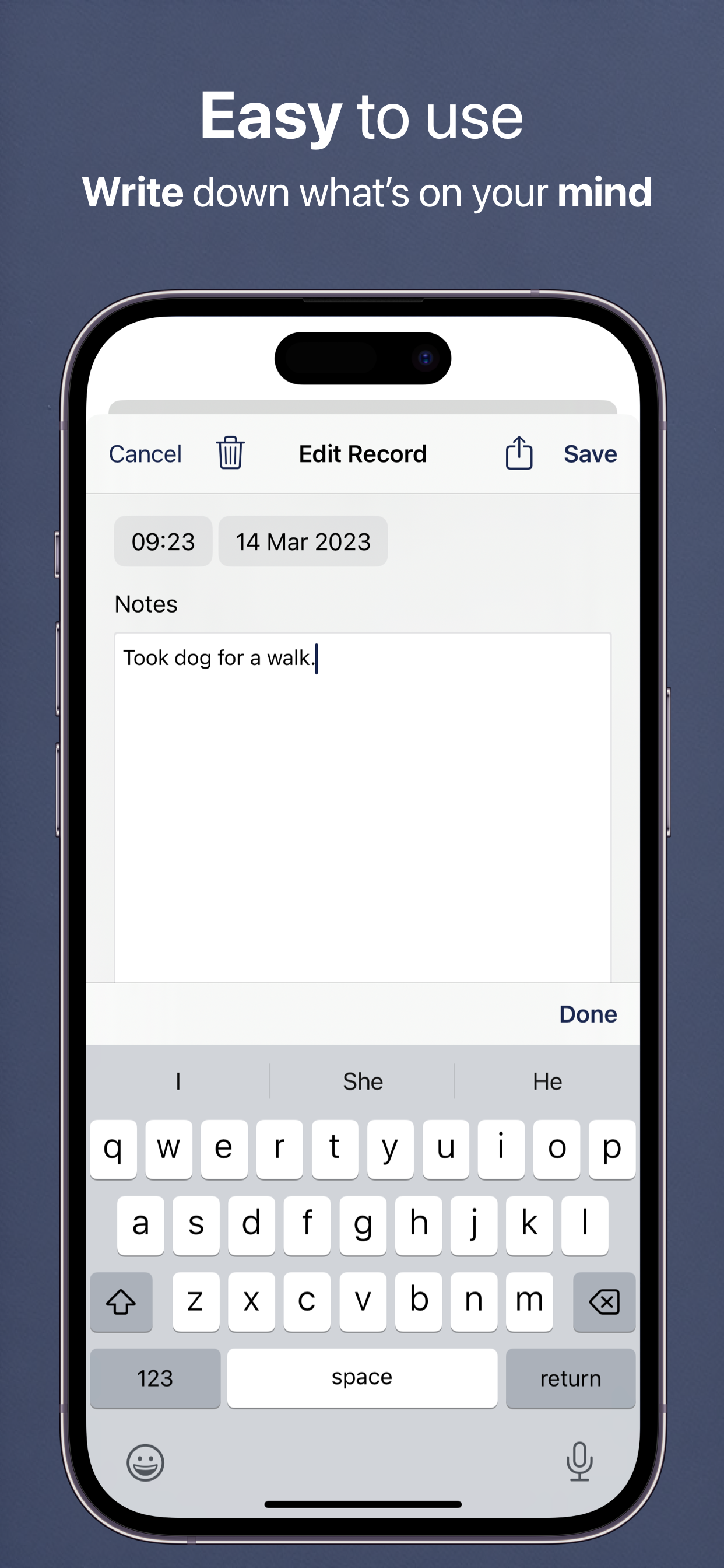
A clean, plain-text editor that puts your words first, with a live word count as you type. Tap AI Rephrase to polish a paragraph, and switch on Markdown rendering if you like headings, bold, and lists in your entry list.
AI Sentiment Analysis
Automatic sentiment detection shows the emotional tone of your entries as you write. Uses privacy-respecting AI — or Apple's on-device Natural Language analysis when AI is switched off.
AI Scanning
Scan objects, documents, receipts, or text with your camera and let AI describe them and extract text. Instantly create journal entries from real-world items.
Word Cloud & Word Frequency
Discover what's really on your mind. A word cloud and a ranked frequency list show the words you use most, with common filler words filtered out in your language — tap any word to open every entry that mentions it.
Photo Journals
Attach up to 8 photos per entry to capture memories visually. Perfect for travel journals, gratitude diaries, or simply documenting your day.
Note Templates
Quick-start your entries with customizable templates. Perfect for gratitude journals, morning pages, goal tracking, or any recurring journaling practice.
Item Scanning
Point your camera at any object and let AI describe it with creative context for your journal. Transform everyday moments into meaningful entries.
Text Scanning
Capture text from documents, signs, or screens with AI-powered OCR. Instantly digitize written content into your journal entries.
Powerful Search
Find any entry instantly with full-text search. Your journals are also indexed in iOS Spotlight for quick access from anywhere on your device.
Your Year at a Glance
A visual grid of every day you wrote — every streak, every gap, every momentum boost. Watch your habit grow at a glance, year after year.
Words That Add Up
Total words written by day, month, and year. Some days you'll surprise yourself — and seeing the count climb is its own kind of motivation.
Recurring Entries
Set up entries that create themselves, daily or weekly, so your habit log, medication note, or nightly gratitude prompt is already waiting for you when you open the app.
How Daily Journal Works
Your personal journaling companion for capturing life's moments and discovering patterns
1. Write Your Thoughts
Instant Entry: Open the app and start writing immediately. No setup, no configuration, no complexity. Just your thoughts and the page. The clean, distraction-free interface helps you focus on expressing yourself.
Rich Media: Enhance entries with photos — attach up to 8 images to capture memories visually, straight from your camera or library, or let AI scan items and text into your entry. Every entry becomes a complete snapshot of your day.
Note Templates: Use pre-made templates for daily reflections, gratitude journaling, goal tracking, dream logs, or create your own custom templates. Templates provide structure while still giving you freedom to write naturally.
2. See Patterns Emerge
Sentiment Gauge: As you write, an optional color-coded gauge rates the emotional tone of the entry, from negative through neutral to positive. Pro adds a Sentiment Timeline that charts how that tone moves across weeks and months.
Word Frequency: Discover which topics, people, or themes you write about most. A word cloud and a ranked frequency list reveal what's consistently on your mind, and tapping a word opens every entry that uses it.
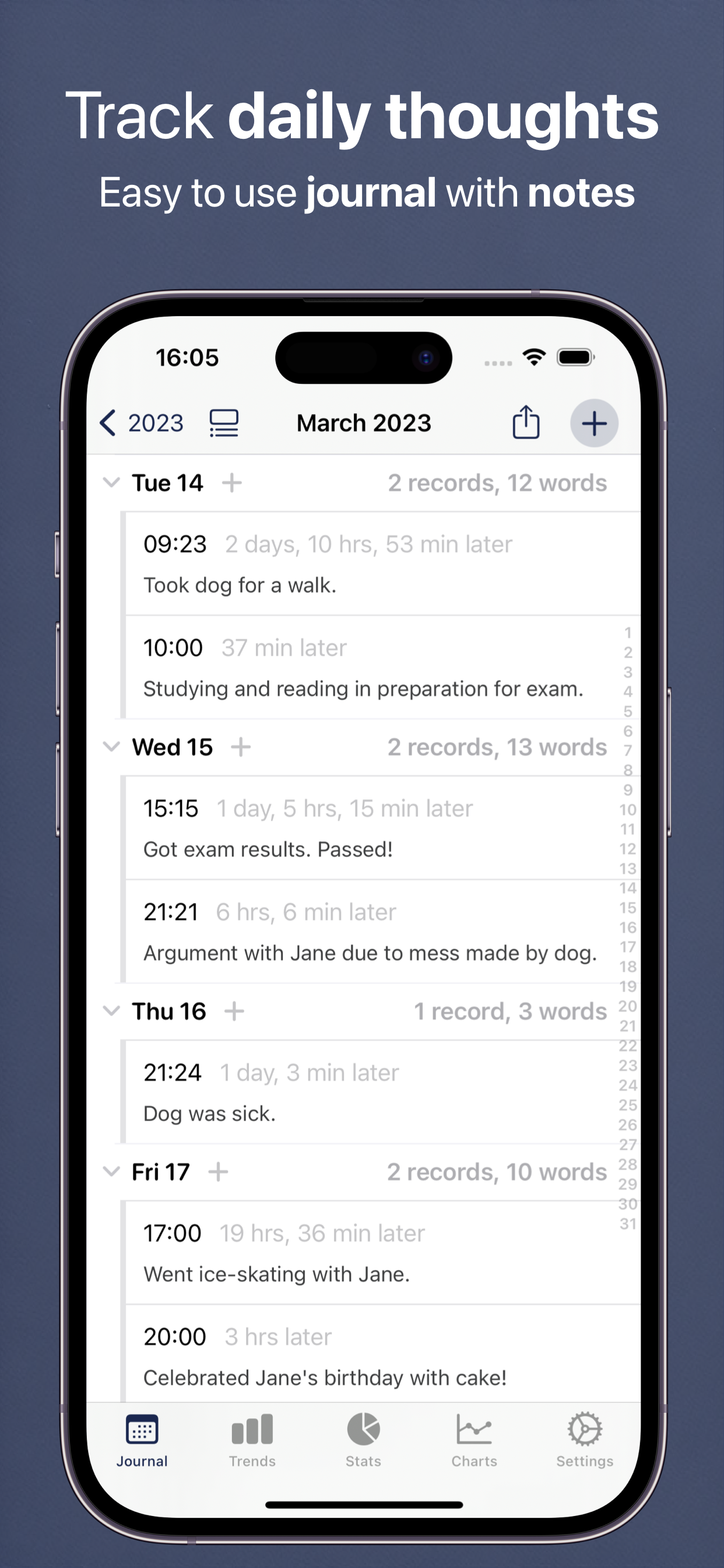
Year, Month, and Day Views: Browse your whole journaling history, from a year heatmap of the days you wrote down to a single day. Each day lists your entries in full, with a record and word count, so you can jump straight to what you were thinking on any date.
3. Reflect and Grow
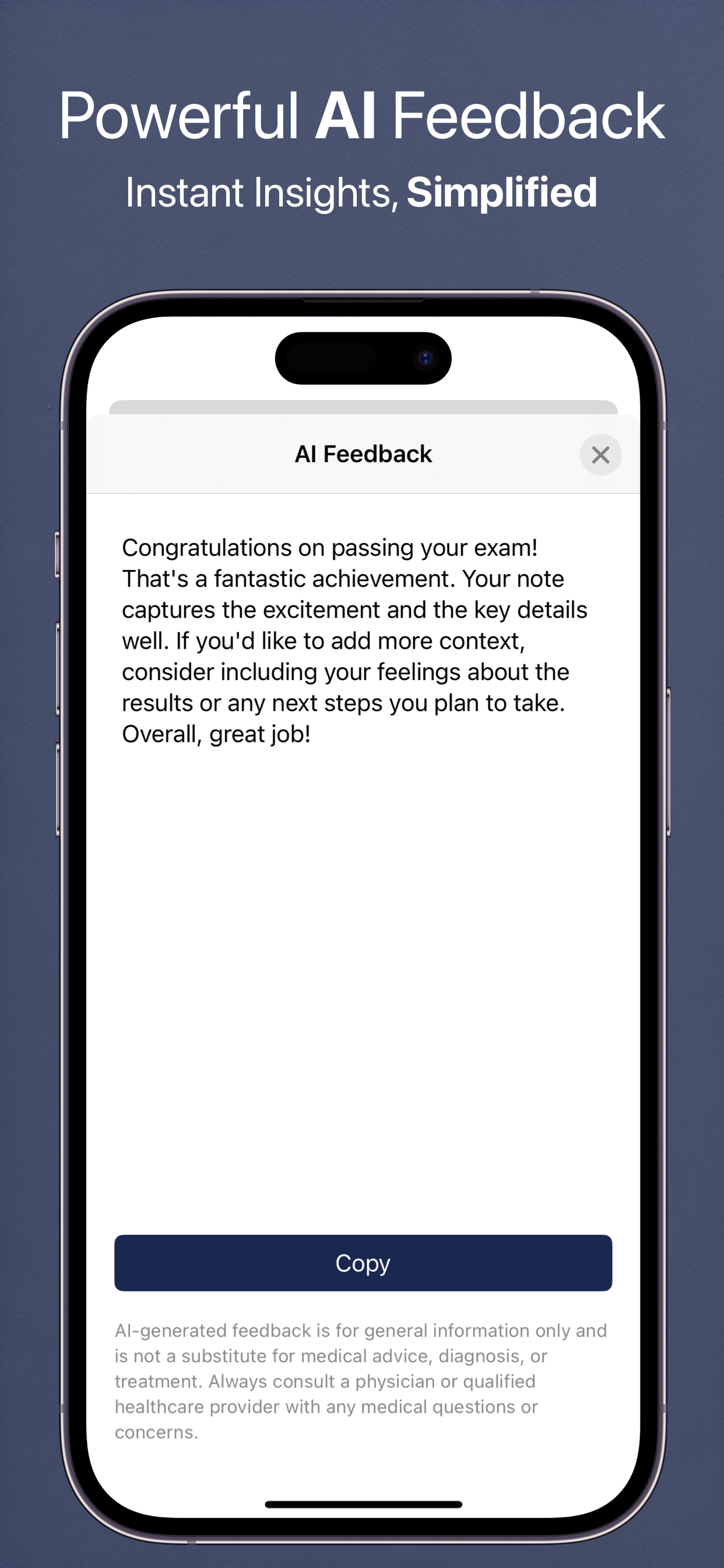
AI-Powered Insights: Ask questions about your journal: "What were my happiest days last month?" or "Show me all entries where I mentioned my goals." Get instant, thoughtful answers that help you understand your journey.
Personal Growth Tracking: Review how your thoughts, concerns, and aspirations evolve. See progress toward goals mentioned in past entries. Identify growth areas and celebrate how far you've come.
Search Everything: Search any word across years of journaling, narrow it to a date range, and jump straight to the matching entries. Your journal is also indexed in iOS Spotlight, so a search from your Home Screen finds it too.
4. Keep Everything Safe
Private & Secure: Your journal lives on your device and in your personal iCloud account — we have no servers storing it, we never access it, and we never sell it. Your words stay yours.
Automatic Backup: Weekly automatic backups (a ZIP of your entries and photos) ensure you never lose your thoughts. Manual backup anytime to export your entire journal. Your words are protected against device loss or failure.
Cross-Device Sync: Write on iPhone, continue on iPad, review on Mac. All your entries sync automatically via iCloud. Your journal follows you everywhere, always up-to-date on every device.
Powered by Artificial Intelligence
Every user gets real AI free every day. Features marked Pro are part of the optional Pro subscription — the fullest version of each feature, on our most capable AI.
Ask a Question
Quick Q&A about your journal entries - get instant answers about your writing
Chat
Have interactive conversations about your journaling journey and get personalized guidance. Quick Chat is free every day; Pro Chat goes deeper on our most capable AI
Voice Summary
Listen to audio summaries of your journal themes - perfect for on-the-go reflection
AI Scanning
Scan objects, documents, receipts, or text to create instant journal entries with AI descriptions
Make Me Laugh
Get personalized humor from your journal entries to brighten your day
Calm Me Down
AI-guided breathing and relaxation exercises to help reduce stress
Deep Research Pro
Comprehensive AI analysis of your journal with detailed insights
Pattern Detective Pro
Find hidden themes and patterns in your journal entries over time
Goal Assistant Pro
Get personalized, data-driven life goals based on your journaling patterns
Doctor Summary Pro
Generate professional summaries to share at healthcare visits
Sick Note Pro
AI-generated sick notes for work or school when you need them
Generate Story Pro
Transform your journal entries into creative, engaging narratives
Text Summary Pro
Create shareable text message summaries of your journal themes
Personal Quiz Pro
Test your knowledge with a fun AI-generated 10-question quiz about your data
Spoken Feedback Pro
A short AI voice note after each save, reacting to what you just wrote
Pro Health Report Pro
Create comprehensive, personalized documents to track your journaling progress
Theme Explorer Pro
Discover recurring topics and ideas in your writing with AI-powered theme analysis
Sentiment Timeline Pro
Visualize your emotional journey over time with AI-analyzed sentiment tracking
Apple Intelligence (On-Device) Pro
Privacy-first option that runs AI locally on your device using Apple's Foundation Models — nothing leaves your iPhone, iPad, or Mac. Unlimited use with a paid account, on supported Apple Silicon devices (iOS 26+).
Voice Chat Pro
Hands-free, two-way spoken conversations with the AI about your data — ask questions and hear answers without touching the screen
AI Disclaimer
AI-generated insights are for general information only — not medical advice, diagnosis, or treatment. Patterns show correlations, not causation. Always consult a qualified healthcare provider for medical decisions.
Why Practice Daily Journaling?
Research shows journaling improves mental health, clarity, and creativity
Mental Clarity
Writing helps organize thoughts and reduce mental clutter
Emotional Processing
Express and process feelings in a safe, private space
Track Progress
See how far you've come by reviewing past entries
Self-Discovery
Uncover patterns in your thinking and behavior
Gratitude Practice
Cultivate thankfulness with daily gratitude journaling
Preserve Memories
Create a personal archive of your life's moments
Available in 32 Languages
Daily Journal is fully localized in: English, Spanish (Español), French (Français), French Canadian, German (Deutsch), Italian (Italiano), Dutch (Nederlands), Portuguese Brazil (Português), Portuguese Portugal, Swedish (Svenska), Norwegian (Norsk), Danish (Dansk), Finnish (Suomi), Polish (Polski), Russian (Русский), Ukrainian (Українська), Czech (Čeština), Slovak (Slovenčina), Romanian (Română), Croatian (Hrvatski), Hungarian (Magyar), Arabic (العربية), Hebrew (עברית), Simplified Chinese (简体中文), Traditional Chinese (繁體中文), Japanese (日本語), Korean (한국어), Thai (ไทย), Vietnamese (Tiếng Việt), Greek (Ελληνικά), Turkish (Türkçe), and Catalan (Català).
Perfect For...
Daily Reflection
End each day by writing about what happened, what you learned, and how you felt. Build a consistent journaling habit with reminders and templates.
Gratitude Journaling
Use note templates to quickly log three things you're grateful for each day. Track your gratitude practice and see positive patterns emerge.
Travel Journals
Document your adventures with photos and detailed notes. Create a rich record of your travels that you can revisit anytime.
Goal Tracking
Write about your goals, track your progress, and reflect on what's working. Use AI insights to see which approaches are most effective.
Creative Writing
Practice daily writing, capture ideas, and develop your voice. The distraction-free interface helps you focus on your craft.
Mood Journal
Write your way through a difficult day, notice what keeps coming up, and look back at how things were a month ago. The sentiment gauge gives you a simple read on each entry's emotional tone.
Frequently Asked Questions
Is my journal private?
Yes — Daily Journal keeps your entries on your device and in your own private iCloud account, so we have no servers holding your journal and nobody at Feeltracker can read what you write. There are no ads and no cross-app tracking. Optional AI features send the entries you ask about to a privacy-respecting cloud service, and you can switch AI off at any time; with AI off, the sentiment gauge runs entirely on-device using Apple's Natural Language framework, and with the Apple Intelligence option every AI feature runs on-device.
How does sentiment analysis work?
Daily Journal scores the emotional tone of each entry as you write and shows it as a color-coded gauge under the text, running from red (negative) through gray (neutral) to green and blue (positive). The gauge is optional and can be turned off in Settings. By default it uses the app's privacy-respecting AI; if you turn AI off, it switches to Apple's built-in on-device Natural Language framework instead.
What is word frequency analysis?
Word frequency analysis in Daily Journal counts the words across all your entries and ranks the ones you use most, so the people, places, and worries that keep coming up become visible. Common filler words are filtered out in your language, the same data is also shown as a word cloud, and tapping any word opens every entry that contains it.
Can I add photos to my journal?
Yes! You can attach up to 8 photos to each journal entry. Photos are stored efficiently with automatic thumbnail generation, and they sync across all your devices via iCloud.
What are note templates?
Templates are pre-written prompts that help you start writing quickly. Create custom templates for things like gratitude lists, daily reviews, goal tracking, or any other recurring format you use.
Can I export my journal entries?
Yes. You can export your entries as PDF, CSV, Excel, or JSON files. This lets you create backups, share selected entries, or move your data to other platforms if needed.
Does it work on Mac?
Yes! The app runs natively on Apple Silicon Macs (M1 and later). Your entries sync automatically between your iPhone, iPad, and Mac via iCloud.
Can I write multiple entries per day?
Absolutely. Write as many entries as you want each day. Some people journal in the morning and evening, while others add notes throughout the day.
Do you show ads or track me?
No. We've completely removed all advertisements from the app. We don't track you across other apps or websites, and we never sell your data to advertisers.
Your data syncs via iCloud - just like Apple Notes and Photos. This means we don't need to know your email address, name, or any personal information. Your journal entries are stored on your devices and in your iCloud account, and they're completely private whether you use the free version or premium.
Do I need a subscription?
No — Daily Journal is free to download and no subscription is required. Writing, photos, templates, recurring entries, word analysis, search, charts, backups, exports, and iCloud sync are all free, and every user gets real AI features free every day (Quick Chat, Ask a Question, Voice Summary, Make Me Laugh, Calm Me Down, plus the Text and Item scanners) — with no ads, ever. An optional Pro subscription unlocks the most in-depth AI features (Deep Research, Theme Explorer, Sentiment Timeline, Doctor Summary, Pro Chat, and more), runs them on our most capable AI, and raises the generous daily limits.
Does Daily Journal work offline?
Yes — Daily Journal works offline for everything that matters: writing entries, attaching photos, searching, browsing your year, and viewing stats and charts all run on your device with no internet connection. Anything you write offline syncs to your other devices via iCloud the next time you go online. Cloud AI features need a connection, but if you switch on the on-device Apple Intelligence mode (Pro, on supported devices running iOS 26 or later), AI works offline too.
Can I import my old journal entries?
Yes — Daily Journal imports journal entries from an Excel spreadsheet. Download the import template from Settings, paste in a date, a time, and the text of each entry, then import the file and every row becomes a journal entry. You can also restore a previous backup, which brings back your entries and their photos together.
Can I lock my journal with Face ID?
Yes — you can lock Daily Journal with Face ID or Touch ID using the app lock built into iOS: press and hold the app icon on your Home Screen and choose Require Face ID. Settings links to the same instructions. Once it's on, nobody can open your journal without your face, fingerprint, or passcode.
What happens to my journal if I lose my phone?
Your journal is safe: Daily Journal syncs every entry and photo to your private iCloud account, so signing in on a new iPhone, iPad, or Mac brings it all back automatically. The app also writes an automatic backup roughly once a week (a ZIP of your entries and photos) that you can restore or export yourself at any time, and you can make a manual backup whenever you want one.
What Users Are Saying
Real reviews from the App Store
"Been looking for something exactly like this for over a year. Perfect app that does what it does without any fuss. I use this to jot down notes about tasks completed, calls made, info learned, etc. I am self-employed and wanted a simple method of keeping a record of info for the myriad projects I have going at any given time. It has a simple search function so as long as I keep my terminology/project name consistent I can pull up entries similar to tag-searching. I love the simplicity of what is essentially a calendar based notes app. I am able to make several short entries on a single date, all visible from the start screen. This feature is a huge part of the app's functionality for me because it allows me to glance at all my notes on a given day while keeping entries separated by project. There's no fancy/cutesy formatting that only shows previews of entries—you can read the entirety of each entry right from the main calendar page."
"This is a nice little simple app that does not overextend into unneeded areas. It is the simplicity of it, including the simplicity of the interface that I value more than anything. I don't need flowers and squirrels and games and peekaboo things and rainbow unicorns. I just need a simple diary-like note app. So far this app has fulfilled those requirements or lack of requirements. It's sort of refreshing. I also appreciate that you can export it in PDF form when there is a need to do so. Thank you for keeping it simple."
"I'm trying to keep a record of pain levels throughout the day. This app is perfect for that!"
"Freedom the snow and how to manage your time"
"Thanks for quick response, that was fast. This project has my support for sure. One last request: Let the AI be a bit more usable, prompt about times etc From Here to Now, maybe some sort of prompt GUI or do one normal yk"
"Just downloaded this app, it's amazing! I love it!"
"I was trying to explain what I do every day to my son who will be taking over my business I realized I needed to write it down as I often forget things. This app has been awesome because now I can explain to him exactly what I do all day for him to take over the business and be successful."
"Uso este diario principalmente para guardar pequeñas victorias ( término relativo) de mi día. Lo Agarro a cualquier hora del día, cuantas veces quiera y Es facilisimo de usar y su estadísticas son asombrosas ( hasta cuenta cuantas veces has utilizado cierta palabra) . Te alienta a seguir adelante y te ayuda francamente a conocerte mejor. Gracias a los creadores, y me encanta que sea gratis, porque ahora todo tienes que pagarlo. La Salud Mental ha venido a tomar precedente en estos últimos años y me siento acuerpada. Gracias!"
"This app is exactly what I needed to log all of my evil neighbors antics with time/date and notes. I didn't want to clog up my regular calendar. This makes it so easy to see only the events that I need to share."
"Love the simple UI. Very minimalist and intuitive. App does journal entries and search very well, just what it says it does. Incredibly useful and really helps keep one organized and quickly refresh of small details throughout the week. The way the 'main page' is a historical tree view of every year kinda feels like unused 'home screen' space but I don't know how you could fill it with something that doesn't look like its just there to take ip space. Love the app and its just what I needed. Literally gonna use it every day now."
"This is an awesome app with minimal features yet benefits every one… I've been using this for a while and very happy with it… every feature is at your fingertips which makes your life easy.."
"I have been looking for something simple like this! And love the little beep noises too- it's a cool app. I forget what I do sometimes so whenever I take my dog out, finish my night routine, shower, or do something productive I record it down. So it's really helpful in reminding I wasn't a sloth or doing too little today."
"Great support, easy to use and accurate. Give it a try you'll be glad you did!"
"Just downloaded this and could instantly tell it was exactly what I was looking for! So clean and easy to use!"
"This app is very simple and makes journaling easy and flexible. Would be nice if it could sync with moleskine's other apps like timepage and actions"
"Hopefully idle time will never slip by unchecked again. Now I'm on the record, and getting sh:t put off for later, done!"
"I've been using this app in a non-typical way. I enter a T, F or B each time I have a thought, feeling or behavior related to my addiction recovery. Then I can see in the trends how my progress is looking over time. I'd really love the ability to select my own date range in the trends view. And be able to compare weeks/months in the trends. Cool app though, thanks!"
"Best app love it 5 stars"
Journaling Guides
Everything you need to start writing and keep going — prompts, templates, methods, and honest answers about what journaling does.
How to Start Journaling
Beating the blank page, and how little is genuinely enough.
Journal Prompts for Every Day
Dozens of real prompts, grouped by what you need them for.
The Benefits of Journaling
What the research supports, and what tends to get overstated.
How to Build a Journaling Habit
Cues, the two-minute version, and recovering from a broken streak.
Daily Journal Template
Copyable layouts for daily, evening and weekly writing.
How to Keep a Gratitude Journal
Doing it so it does not go stale, plus prompts to draw on.
Morning Pages
Three pages, first thing — what the practice is actually for.
Bullet Journaling
Rapid logging and migration, without the decorative overhead.
Journaling for Anxiety and Stress
Processing versus rumination, and how to tell them apart.
Digital vs Paper Journaling
A fair comparison across privacy, search, longevity and cost.
Explore our other apps




Start Your Journaling Practice Today
Join thousands discovering the benefits of daily reflection