
Weight Journal
Reach your fitness goals with intelligent weight tracking. Scan readings with Camera Scan AI, monitor weight, BMI, and body fat percentage with AI-powered insights that show what's working and what's not.

Free app with optional premium features
iPhone, iPad & Mac • iOS 16.0+

See Weight Journal in Action
Smart Features for Weight Management
Camera Scan AI
Point your camera at your scale's display and the AI reads the number straight into your entry. Point it at a plate instead and you get an estimate of calories, protein, carbs and fat. Free on every plan, no typing either way.
Complete Body Tracking
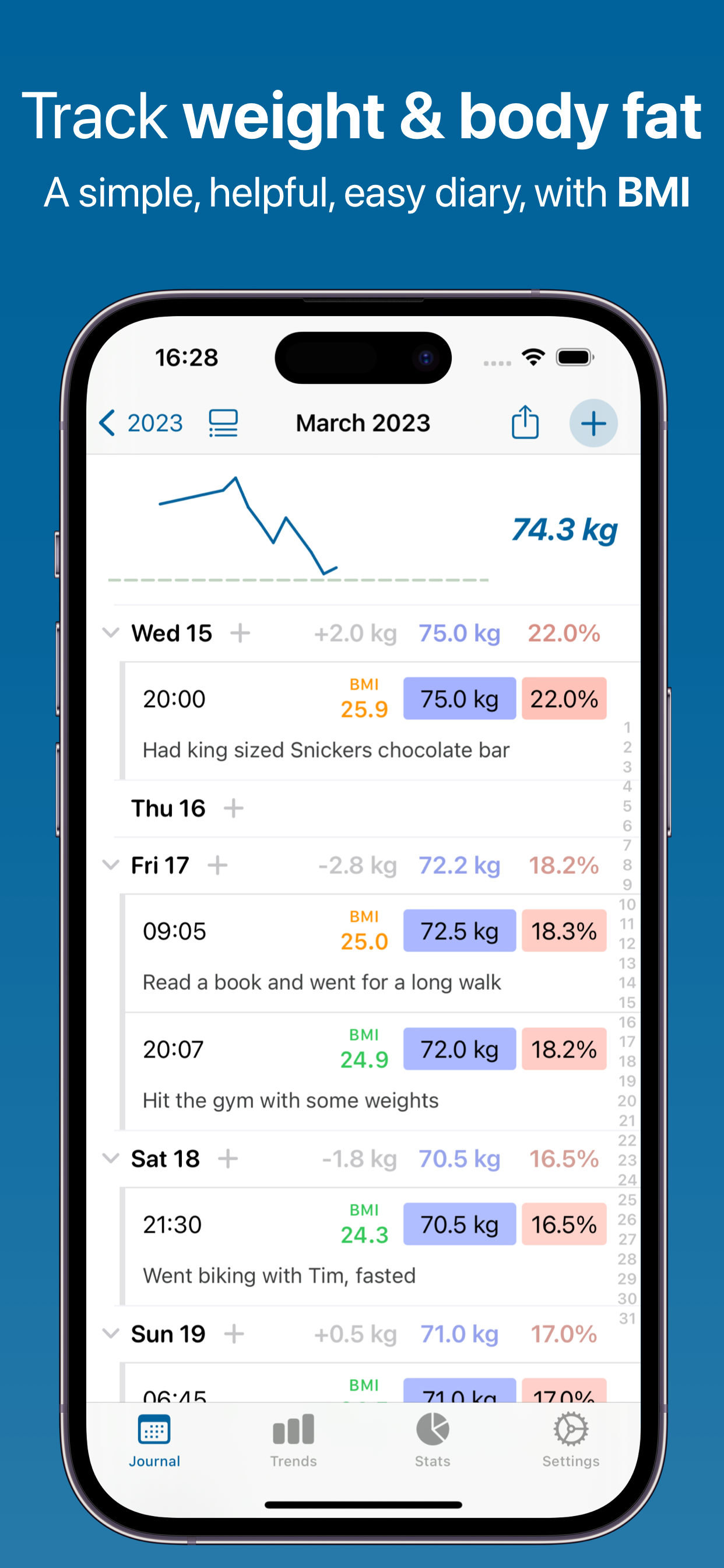
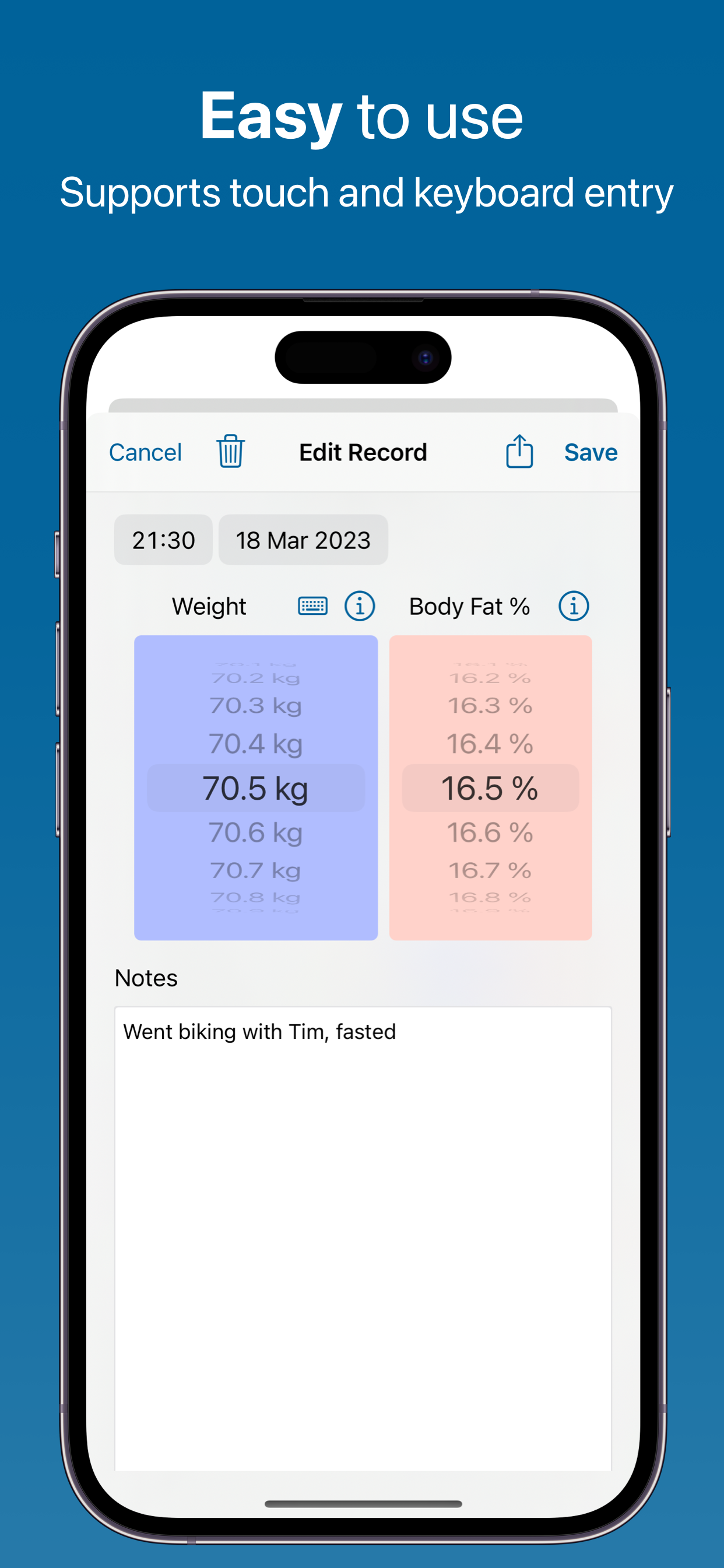
Log weight with the picker or tap to type it, add body fat percentage if your scale reports one, and BMI is worked out for you from the height you set once in Settings. Switch between kg and lbs whenever you like.
Trends & Averages
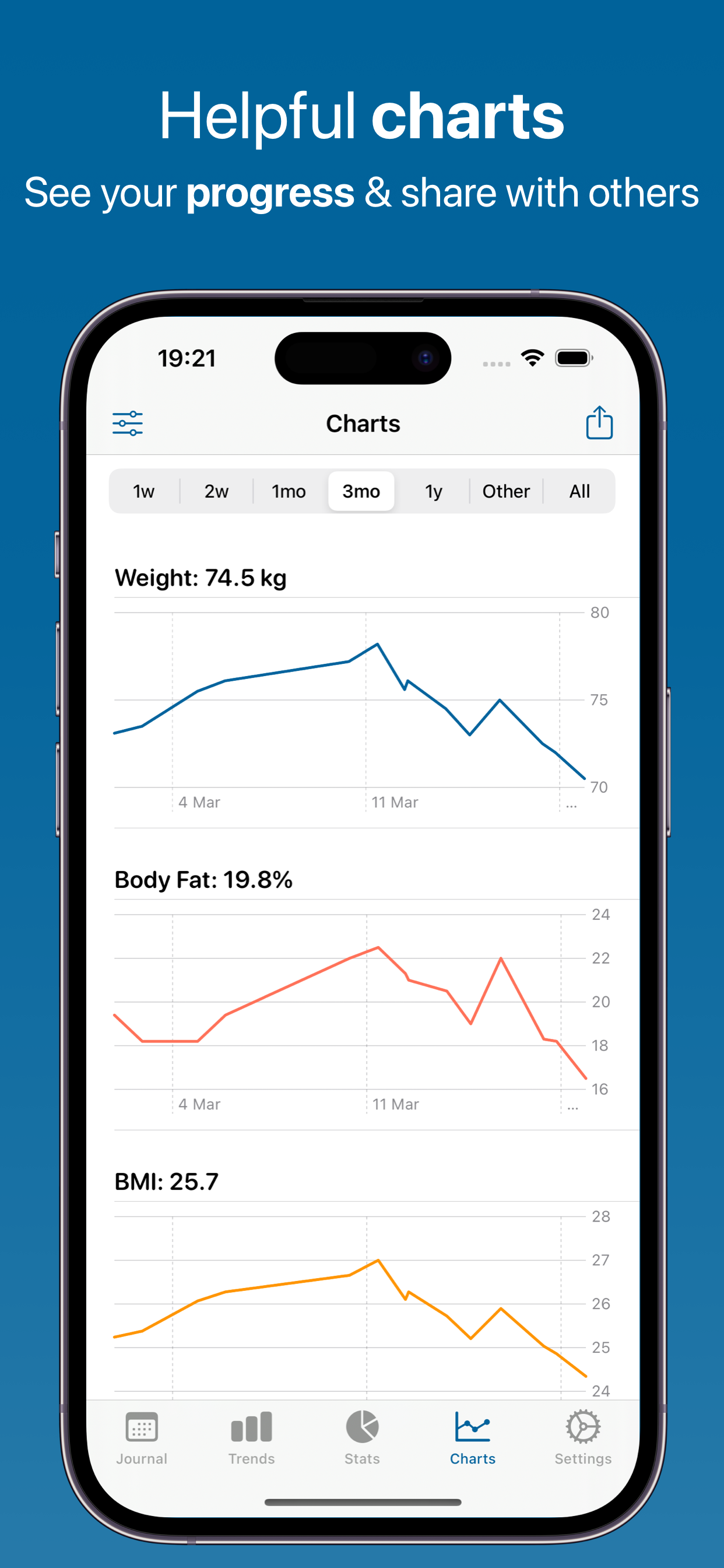
Monthly averages in the month and year views, daily averages across any date range you pick, and interactive charts showing weight, body fat and BMI side by side.
Goal Tracking
Set a target weight and it appears as a line right on your chart, with a Difference to Target stat so you always know where you stand — up, down or holding steady.
Apple Health Integration
Two-way Apple Health sync for both weight and body fat percentage. Import history recorded by a smart scale, Apple Watch or another app, choose exactly which readings to bring in, and write your own entries back to Health.
Food Scanning
Take a photo of a meal and the AI names it and estimates calories, protein, carbs and fat. Save that estimate, and the photo, into the day's entry so the context sits right next to the number on the scale.
AI-Powered Insights
Discover what affects your weight. AI analyzes your notes to identify which foods, exercises, or habits correlate with weight changes.
Calendar View
Browse a year heatmap, a month grid and a day-by-day list. Every entry shows its weight, body fat percentage and a color-coded BMI at a glance.
Live Number on Your App Icon
Show your current weight — or how far you are from your target — right on the app's Home Screen icon. A quiet daily nudge that doesn't even need you to open the app.
BMI & Body Fat, Built In
BMI is auto-calculated from your weight and height with color-coded categories. Body fat tracking is optional — its own chart appears the moment you start logging it.
How Weight Journal Works
Your complete weight management system with AI-powered insights
1. Log Your Weight & Food
Scan Scale Display: Point your camera at your scale's digital display and the AI reads the weight into the entry for you. It works with digital scales from any brand — and you confirm the number before it saves, so a misread is one tap away from being fixed.
Scan Food: Take a photo of a meal or snack and the AI names it and estimates calories, protein, carbs and fat. Save the estimate into that day's entry, with the photo if you want it, so what you ate sits beside what the scale said.
Manual Entry: Prefer to type? Enter weight with the picker or the keyboard, add body fat percentage if you have it, and BMI is calculated automatically from your height setting.
Rich Context: Add notes about your day — meals, training, water, sleep, stress, travel, medication, anything that might be part of the picture. Attach photos to document the journey visually alongside the numbers.
2. Track Progress
Visual Tracking: See your history as interactive charts for weight, body fat percentage and BMI. Pick a range — a week, a month, a year or a custom span — and your target weight is drawn straight onto the chart.
Smart Averages: Monthly averages appear in the month and year views, daily averages across whichever range you select, and a Difference to Target stat shows the gap between today and your goal. Averages are what smooth out the day-to-day water swings a single weigh-in can't.
Milestone Celebrations: The app celebrates your logging consistency - a personal AI-written note marks your 5th, 10th, 50th, 100th entry and beyond. Small moments of encouragement that keep the habit going.
3. Discover Patterns
AI Analysis: Artificial intelligence analyzes your notes to identify what correlates with weight changes. Discover insights like "You lose more weight in weeks when you mention meal prep" or "Weight increases on weeks with less than 5 exercise sessions."
Personalized Insights: Get specific recommendations based on your unique data. AI might notice "Your weight drops 0.3 lbs more on weeks with morning workouts" or "Weekends show consistent 1 lb increases that normalize by Wednesday."
Interactive Chat: Ask questions about your data in plain English: "What's my average weight loss per week?" or "Show me all weigh-ins after cheat days." The AI understands context and delivers instant answers from your tracking history.
4. Reach Your Goals
Goal Setting: Set a target weight and it becomes a reference line on every chart, a Difference to Target stat in your statistics, and — if you want it — a live number on the app icon. No countdown clock and no projected finish date: just a clear picture of where you are relative to where you're heading.
Professional Reports: Export your history as PDF, CSV, Excel, or JSON for a doctor, dietitian, or trainer. Reports carry your weight, BMI and body fat charts plus the notes you wrote about diet, training and sleep — everything a consultation benefits from, on paper.
Apple Health Integration: Two-way sync with Apple Health for weight and body fat percentage. Import readings from a smart scale, Apple Watch or another app, turn on auto-import so new ones arrive on their own, and write your entries back so the rest of your health picture stays in step.
Powered by Artificial Intelligence
Every user gets real AI free every day. Features marked Pro are part of the optional Pro subscription — the fullest version of each feature, on our most capable AI.
Ask a Question
Quick Q&A about your weight data - get instant answers to your health questions
Chat
Have interactive conversations about your fitness journey and get personalized guidance. Quick Chat is free every day; Pro Chat goes deeper on our most capable AI
Voice Summary
Listen to audio summaries of your weight trends - perfect for on-the-go insights
Make Me Laugh
Get personalized humor from your tracking data to brighten your day
Calm Me Down
AI-guided breathing and relaxation prompts for a moment of calm whenever you need one
Camera Scan AI
Read your scale's display, or estimate a meal's calories and macros from a photo. Free on every plan, with a fair-use daily limit
Deep Research Pro
Comprehensive AI analysis of your weight data with detailed insights
Pattern Detective Pro
Find hidden correlations between your weight and lifestyle factors
Goal Assistant Pro
Get personalized, data-driven weight goals based on your patterns
Doctor Summary Pro
Generate professional weight management summaries for healthcare visits
Sick Note Pro
AI-generated sick notes for work or school when you need them
Generate Story Pro
Transform your weight journey into creative, engaging narratives
Text Summary Pro
Create shareable text message summaries of your weight trends
Personal Quiz Pro
Test your knowledge with a fun AI-generated 10-question quiz about your data
Text-to-Speech Pro
Listen to your AI insights and summaries with natural voice playback
Pro Health Report Pro
Create comprehensive, personalized fitness documents to track your progress
Meal Planner Pro
Get a personalized weekly meal plan built around your goals and food preferences. Quick Meal Ideas is free every day; the Pro planner goes further on our most capable AI
Exercise Planner Pro
Get a personalized workout routine tailored to your fitness level and goals
Apple Intelligence (On-Device) Pro
Privacy-first option that runs AI locally on your device using Apple's Foundation Models — nothing leaves your iPhone, iPad, or Mac. Unlimited use with a paid account, on supported Apple Silicon devices (iOS 26+).
Voice Chat Pro
Hands-free, two-way spoken conversations with the AI about your data — ask questions and hear answers without touching the screen
AI Disclaimer
AI-generated insights are for general information only — not medical advice, diagnosis, or treatment. Patterns show correlations, not causation. Always consult a qualified healthcare provider for medical decisions.
Why Track Your Weight?
A few seconds on the scale is enough to see the bigger picture
Stay Accountable
A daily reminder, a home-screen widget and your weight on the app icon keep the habit easy to keep
See Real Progress
Monthly averages and a target line show the direction a single weigh-in can hide
Understand Your Body
Notes on meals, training and sleep sit beside every number, so patterns surface over time
Make Better Choices
See what your own record actually shows before you change anything
Celebrate Wins
Milestone notes mark your 5th, 10th, 50th and 100th entry, and every one after
Maintain Results
Keep logging past your target and the same charts show whether you are holding steady
Available in 32 Languages
Weight Journal is fully localized in: English, Spanish (Español), French (Français), French Canadian, German (Deutsch), Italian (Italiano), Dutch (Nederlands), Portuguese Brazil (Português), Portuguese Portugal, Swedish (Svenska), Norwegian (Norsk), Danish (Dansk), Finnish (Suomi), Polish (Polski), Russian (Русский), Ukrainian (Українська), Czech (Čeština), Slovak (Slovenčina), Romanian (Română), Croatian (Hrvatski), Hungarian (Magyar), Arabic (العربية), Hebrew (עברית), Simplified Chinese (简体中文), Traditional Chinese (繁體中文), Japanese (日本語), Korean (한국어), Thai (ไทย), Vietnamese (Tiếng Việt), Greek (Ελληνικά), Turkish (Türkçe), and Catalan (Català).
Frequently Asked Questions
How does Camera Scan AI work?
Weight Journal reads your scale's display through your iPhone or iPad camera and fills the weight in for you. Point the camera at the digital display, tap scan, and the AI returns the number for you to confirm and save - no typing, no transposed digits. Scanning is free on every plan, with a fair-use daily limit.
How often should I weigh myself?
Weight Journal fits any weigh-in rhythm - daily, weekly, or simply whenever you remember. Weighing at the same time of day, usually first thing in the morning, makes readings easier to compare, and the monthly averages smooth out the day-to-day swings either way. There is no streak to break and no penalty for skipping days.
What is BMI and why does it matter?
BMI (Body Mass Index) is weight in kilograms divided by height in meters squared, and Weight Journal calculates it on every entry from the height you set once in Settings. It is a rough screening number rather than a verdict: it cannot tell muscle from fat, so very muscular people often read high. The app shows it as a color-coded value and on its own chart beside weight and body fat, and what it means for you is a conversation for your doctor.
How do I measure body fat percentage?
Weight Journal records body fat percentage but does not measure it - for that you need a body composition scale. Scales using bioelectrical impedance (brands like OMRON, Tanita and Withings) report a body fat figure alongside weight; enter it with the picker, or let it arrive automatically from Apple Health. A dedicated body fat chart appears as soon as you log your first value.
Why does my weight fluctuate daily?
Daily weight commonly swings by a kilogram or two (roughly two to five pounds) from water, salt, hormones, meal timing and digestion - that is normal, and it is not a change in body composition. It is exactly why Weight Journal puts monthly averages in the month and year views: the trend is the useful signal, a single morning rarely is.
Can I import weight from Apple Health?
Yes - Weight Journal reads and writes both weight and body fat percentage in Apple Health. Import your history in one pass, including readings from a smart scale, an Apple Watch or another app, tick exactly which entries you want, and switch on auto-import so new ones arrive by themselves. Entries you add in the app are written back to Health too.
How does AI help with weight loss?
The AI in Weight Journal reads the notes attached to your entries and points out what tends to line up with your own weight changes. Write down what you ate, how you trained, how you slept, and over time it can surface patterns like weeks you mentioned meal prep, or stretches with fewer workouts. It is pattern-spotting from your own record, not a diet plan - general information only, never medical advice.
Can I track weight in pounds and kilograms?
Yes - Weight Journal supports both kilograms and pounds, and you can switch at any time in Settings without losing a thing. Weight is stored in one canonical form and simply redisplayed in your chosen unit, so your entire history, charts and exports convert with you. Height uses matching metric or imperial units for the BMI calculation.
Can I export my weight data?
Yes - Weight Journal exports your full history as PDF, CSV, Excel, or JSON, and the Trends screen adds HTML and plain text. The PDF carries your charts, which makes it the easiest thing to hand to a doctor, dietitian, or trainer. Exports are free, with no account and no subscription required.
Is this a diet or meal tracking app?
No - Weight Journal is a weight, BMI and body fat diary, not a calorie counter. There is no food database, no daily calorie target and no running macro total. What it does have is the AI Food Scan: photograph a meal and it estimates calories, protein, carbs and fat, then saves that estimate as text in that day's entry, right beside the number on the scale. The Pro Meal Planner can suggest meals around your goals, but nothing keeps a nutritional ledger for you.
Do you show ads or track me?
No. Weight Journal carries no advertisements at all, does not track you across other apps or websites, and never sells your data to advertisers.
Your data syncs via iCloud - just like Apple Notes and Photos. This means we don't need to know your email address, name, or any personal information. Your weight and health data is stored on your devices and in your iCloud account, and it's completely private whether you use the free version or premium.
Do I need a subscription?
No - Weight Journal is free to download, and all tracking, charts, Apple Health sync, camera scanning and exports are free, with real AI features every day and no ads, ever. An optional Pro subscription unlocks the most in-depth AI features (Deep Research, the Meal & Exercise Planners, Pattern Detective, Doctor Summary, Pro Chat, and more), runs them on our most capable AI, and raises the generous daily limits.
Can I set my own height for the BMI calculation?
Yes - Weight Journal asks for your height once and then calculates BMI automatically on every entry. You will find it in Settings, in metric or imperial to match your weight unit, and you can change it whenever you like. BMI then appears as a color-coded value on each entry and on its own chart beside weight and body fat.
Does the food scan keep a daily calorie total?
No - the Food Scan in Weight Journal is a per-photo estimate, not a running tally. Each scan writes the food name plus estimated calories, protein, carbs and fat into that entry's notes, with the photo if you want it, and that is where it stays: no daily total, no calorie budget, no macro dashboard. The notes are yours to read back, export, or ask the AI about.
Is Camera Scan AI free, or do I need Pro?
Camera scanning is free for everyone in Weight Journal - both the scale scanner and the food scanner, on the free tier and on Pro alike. There is a generous daily cap that keeps the service sustainable and resets every 24 hours; the app tells you if you ever reach it. Pro raises the limits on the deeper AI reports, not on scanning.
Does Weight Journal work on iPad and Mac?
Yes - Weight Journal runs on iPhone and iPad, and natively on Apple Silicon Macs (M1 and later). One purchase covers all of them, and your entries, photos and settings sync automatically over iCloud, so you can weigh in on your phone in the morning and read the charts on a bigger screen later.
What Users Are Saying
Real reviews from the App Store
"Best weight app in the App Store. Simple to use and it's loaded with valuable information. I use it everyday."
"I find this app is outstanding except for two minor flaws that just irritate me but still works out very well. 1: the weight always goes back down to 150 instead of staying at your weight you last put in. It would be much more convenient if it stayed at the weight that you put in instead of having to scroll through the weights to get to where you're current weight. 2: the BMI should be automatically calculated instead of trying to do the calculation manually."
"Simple food diary. Awesome."
"This app helped me lose 10kg in three months. The simple tracking and AI insights helped me understand what was blocking my progress."
"I've tried many weight apps but this is the best. Clean interface, easy to use, and the charts are very helpful for seeing progress."
"The scale scanning feature with the camera saves me so much time. Just point your phone at the display and the weight is captured automatically — no manual entry needed."
Weight Journal Guides
Make sense of the numbers on the scale — from BMI and body fat to plateaus and what a normal day-to-day swing really looks like.
BMI Chart for Adults
Every BMI category on one chart, with height and weight ranges.
How to Calculate BMI
The metric and imperial formulas worked through — and where BMI falls short.
Healthy Weight for Your Height
Healthy ranges by height, in both kilograms and pounds.
Body Fat Percentage Explained
Category charts for men and women, and how each measuring method compares.
Waist-to-Height Ratio
The simple 0.5 rule, and why it catches what BMI misses.
Why Your Weight Fluctuates Daily
Water, salt and hormones — how big a normal swing really is.
How Often Should You Weigh Yourself?
Daily or weekly, the evidence for each, and when to step off the scale.
How to Break a Weight Loss Plateau
Why progress stalls, and a diagnostic sequence to work through.
How Fast Can You Safely Lose Weight?
Realistic weekly targets and the deficit maths behind them.
Weight Loss Chart and Log Template
What to record, and how to read a trend out of noisy data.
Smart Scales and Body Fat Accuracy
What bioimpedance really measures, and which numbers are worth logging.
Explore our other apps




Start Your Weight Journey Today
Join thousands reaching their fitness goals with Weight Journal